TECH ADVICE

Science and Technology

  • Home
  • Sitemap
  • About Us
  • Privacy Policy
  • Contact Us
  • Home
Showing posts with label Reliance Tricks. Show all posts

Saturday, 7 January 2017

[Official] Reliance Jio Free Unlimited Internet 3 Hours Daily

 Psk4u     16:52     Free Internet Data, Reliance Tricks     No comments   

 [Official] Reliance Jio Free Unlimited Internet 3 Hours Daily
 
Even i was unaware of this official offer in which Reliance Jio unlimited internet for 3 hours daily on Jio Happy New Year offer till today’s day but after knowing about this amazing information about the same we thought this would be most informative for all users.As i can see users are frustrated with Jio Happy New Year offer as Jio has applied the FUP 1GB/day and there is a need to having a trick to bypass/ uncap/ unlock/ remove daily 1GB /day limit. For the same purpose we have already added the trick to bypass Reliance Jio 1GB daily limit, have a look to the below link to access the same.

Official timing for Reliance Jio Free Unlimited Internet 3 Hours Daily

Well it’s fantastic to get a free unlimited 4G access to 3 hours without any limit but wait there is a catch in this official offer this timings to utilize this freebie for unlimited internet is from 2AM to 5AM total of 3 hours daily also this free internet data isn’t counted against your daily 1 GB high-speed limit.
[official] reliance jio free unlimited internet 3 hours daily
 

Important thing one must keep in mind while using free internet data from 2AM to 5AM:  

Just one thing make sure you start downloads after 2.05 AM and stop/pause before 4.50AM to be on safe site, violating this may cost your daily free internet data of 1GB which you have credit for the rest of the day.
Read More
  • Share This:  
  •  Facebook
  •  Twitter
  •  Google+
  •  Stumble
  •  Digg
loading...

Sunday, 27 November 2016

Reliance Unlimited Voice Calling Plans

 Psk4u     09:57     Reliance Tricks     No comments   

Before this Plans Reliance Rcom Offering Unlimited voice Calling plans at Rs. 399 after coming reliance jio , All Networks Reduced their plans rate to Save their customers  Reliance Launched this Reliance Unlimited Voice Calling Plans For Rs. 149 , Rs. 299 & Rs. 499 Plans on 22th November 2016 you can avail this over by recharge your reliance sim from your nearest retailer or Follow below steps for Online recharge.


Reliance Unlimited Voice Calling Plans


 Reliance Unlimited Voice Calling Plans :-


 Reliance Rs. 149 Plan:-


First unlimited voice calls plan is start from Rs. 149 Only. You will get Unlimited voice Calling to any mobile network as well std numbers with 28 days validity and free internet data of 300 mb which works on any network. Incoming Roaming is also free for 28 days.


  • Unlimited Voice calling to any Network. 
  • 300 Mb 2g/3g/4g internet data. 
  • incoming roaming charges free. 
  • Unlimited std calling For Free. 
  • Validity 28 days


Reliance Rs. 299 Plan:-

 All the benefits will be same Just internet data is increased to 2 gb.


  • Unlimited Voice calling to any Network. 
  • Free 2 gb 2g/3g/4g internet data.
  •  No charges on  incoming roaming. 
  • Unlimited std calling Minutes for free.
  •  Validity 21 days. 


Reliance Rs. 499 Plan:-


Third one Rs. 499 Plan Is best Unlimited plan. Because after recharge this pack you don’t need to recharge for 1 month.


  • Free incoming roaming and Free 4 gb internet data with 28 days validity. 
  • Voice calling to any Network. 
  • 4Gb Free 2g/3g/4g internet data.
  •  Limitless incoming roaming.
  •  Unlimited Free std calling minutes. 
  • Validity 28 days. 


How To Activate This Reliance Unlimited Voice Calling Plans :-


These are normal plance of reliance you can go to reliance recharge outlet or you can recharge online through the paytm,freecharge app,


Thanks friends and please share this to your friends ........................
Read More
  • Share This:  
  •  Facebook
  •  Twitter
  •  Google+
  •  Stumble
  •  Digg
loading...

Monday, 7 November 2016

Jio SIM Online Registration – Get Jio SIM at Doorsteps

 Psk4u     11:52     Reliance Tricks     No comments   


Jio is shockingly getting popular for its well-known Jio Welcome Offer. As they are rapidly expanding their services and also trying to improve and be provoked with their quality services.

Jio SIM Online Registration – Get Jio SIM at Doorsteps

Recently, they announced to add 45,000 more Jio towers in all over India, which should also make the speed of Jio unrivalled. These all proves Jio, one of the best Telecom service provider.

We here always try to provide you latest information about Jio Welcome Offer & JIO SIM Card continuously on our site, so that you never miss to get benefits from that offers.

Recently, we had posted a trick by which you can generate unlimited Jio bar code using your PC and get Jio SIM card for free. We are continuously helping all people, who face difficulties in getting Jio SIM card, so we always post genuine ways and processes.

Reliance has becoming immensely popular by getting 16 million subscription in less than single month. This shows how they’re getting popular day by day. If we look at current scenario, looks like they soon will reach each and every mobile phone users of India.

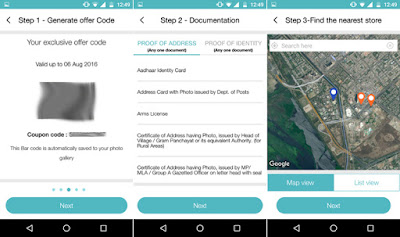
Now, again Jio has started an another quality service, which was in suspicion till last month but as from now, they are delivering Jio SIM Card at your doorsteps and now you can order it online also. Jio SIM Online Registration process has been started from now and you can get Jio SIM Card at your home using this method.

Also, your Jio SIM card will be started in only 15 minutes after you get it. Just because they started eKYC method to activate your SIM.

Let’s see now Jio SIM Online Registration process.

Jio SIM Online Registration – How to Register and Get Jio SIM

  • Log in to Jio.com and register for delivery at door by filling in personal details including current residential address.
  • Once you have registered for ‘4G SIM door delivery system’, a Reliance Jio executive will arrive at your home soon.
  • Things which you need to give the executive
  • ◇ Local Aadhaar Card
  • ◇ 4G enabled handset
  • ◇ Jio App, which should be downloaded on your mobile
  • ◇ Jio Bar Code
  •  The executive will ask for Aadhaar card details and take fingerprint details on eKYC machine.
  • When all done, submit Jio Bar Code to him and your SIM card will be activated in 15 minutes.
Follow above mentioned steps as written, that is proper Jio SIM Online Registration process, otherwise you won’t get Jio SIM.
Cities in which currently Jio SIM home delivery facility is available:-
  • Mumbai
  • New Delhi
  • Kolkata
  • Pune
  • Ahmedabad

Also, we have also heard a solid news that Jio might extend their well-known Jio welcome offer till march 2017.

Jio is offering lot of features in their services, all Jio apps are very useful. They are also offering Free Jio Caller Tune for 30 days of your choice, and even after that 30 days you can activate it again for free.
Don’t so late to get it. Order today “Jio SIM card using Jio SIM Online Registration process”.
Good Luck!
Don’t forget to share it with your friends…
Read More
  • Share This:  
  •  Facebook
  •  Twitter
  •  Google+
  •  Stumble
  •  Digg
loading...

Free Jio Caller Tune For 30 Days – How to Activate Guide

 Psk4u     11:51     Free, Reliance Tricks     No comments   


Again JIO! yes, it’s a most trending topic nowadays due to its well-known “Jio welcome offer”. Jio is offering free unlimited calls, messages, SMS till 31st December 2016. We all are very much excited to have fun with this offer.
 
Presenting, Trick to activate Free JIO caller tune for one month as per your choice in your Jio SIM card. All we know that all services offered by Reliance Telecom; JIO is free til 31st December 2016. So, you can also set a Free Jio Caller tune on your JIO number by using this method and you don’t have to pay single dime for it.

Free Jio Caller Tune – How to Activate

  • Open messaging app in your smartphone.
Now, If your Smartphone supports VoLTE then use default messaging app.
If your Smartphone doesn’t supports VoLTE then use Jio4GVoice app.
  • Now compose a message as like below:Write : JT and Send it to 56789If You want to Specific your favorite Song Then Write like Below Write : MOVIE <movie Name> send it to 56789 SINGER <singer Name> send it to 56789 ALBUM <Album Name> send it to 56789
  • Allright ! Now you will get an another message within plenty of seconds with full song list.
Free Jio Caller Tune For 30 Days – How to Activate Guide


  • Just Select Any Your Favourite Song with Number and reply
  • You will Get Another SMS for Final Confirmation Just Reply ” Y “ To That Message
  • Now, you will get a final confirmation message like below.
Free Jio Caller Tune For 30 Days – How to Activate Guide

  • Voila! You have Activated free Caller tune In Jio SIM for 30 days
Free Jio Caller Tune For 30 Days – How to Activate Guide

  •  You can again repeat this process and get Free Jio Caller Tune for 30 days more.

Free Jio Caller Tune – How to Deactivate 

  • Let say for any reason you want to STOP this free device offered by Jio, then just follow below steps to deactivate it.
  • SMS : STOP and send it to 56789
  • All done!
Read More
  • Share This:  
  •  Facebook
  •  Twitter
  •  Google+
  •  Stumble
  •  Digg
loading...

Tuesday, 25 October 2016

Reliance Jio USSD Codes to Check Balance & Data

 Psk4u     21:30     Reliance Tricks     No comments   

Reliance Jio USSD Codes to Check Balance & Data


As a part of Jio preview offer, everybody is getting unlimited data & free voice calling. This offer will be valid till 31st December 2016 so you don’t need to worry about 4G data spent until this year end.
But after the expiry of ‘welcome offer’ you will be having restricted data & that time you will need to check it frequently using Reliance Jio USSD codes.

There are different ways to check your 4G data & account balance. What are they?
Let’s check it out…


Reliance Jio 4G Ussd Codes List :


Ussd Code To Check Main Balance
Dial *367# to check main balance of your Jio sim or Number.

Ussd Code To Check Internet Data/Balance In Reliance Jio
*333*1*3*#

Ussd Codes To Check Sms Balance
*367*2#

Ussd Codes To Check Local Call Minutes
*367*2#

Balance Information
*333*1*2*1#

Ussd Code To Check VAS Balance
*333*1*4*1#

Ussd Code To Activate Miss Call Alert Service
*333*3*2*1#

Ussd Code To Deactivate Miss Call Alert Service
*333*3*2*2#

Ussd Code To Activate Caller Tune
*333*3*1*1#, check Reliance Free caller tune offer for 1 Month

Ussd Code To Deactivate Caller Tune
*333*3*1*2#

How To Know Your Number In Reliance Jio
*1#

Ussd Code To Check Recharge Offer
*789#

Ussd Code To VAS Service ( News , My Tunes , Ringtones )
*999# or *123#

Ussd Code To Recharge From Scratch Card
*368# or *305*<14 digit="" pin="">#


This all reliance Jio ussd codes will help you to activate service and deactivate , Check Balances and other things in reliance Jio. If any more Ussd codes will come then we “ll update here. If you get any problem in Reliance Jio then Dial 198 to Call Customer care and follow ivr instructions. Don’t forget to share by clicking below social icon
Read More
  • Share This:  
  •  Facebook
  •  Twitter
  •  Google+
  •  Stumble
  •  Digg
loading...

Tuesday, 18 October 2016

Trick To Generate Reliance Jio Barcode From Any 2G/3G Device

 Psk4u     14:03     Hacking Tricks, Network Tricks(Other), Reliance Tricks, Special Tricks     No comments   


 Trick To Generate Reliance Jio Barcode From Any 2G/3G Device
As the Reliance Jio SIM is the recent buzz all over the country, everyone wants to grab hold of one to enjoy the benefits that it offers the buyers.
 Trick To Generate Reliance Jio Barcode From Any 2G/3G Device
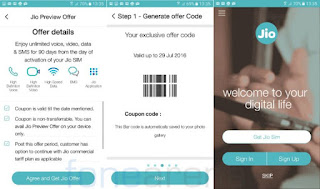
In order to get a Reliance Jio SIM card, the very first step that you need to do is generate a unique barcode that should be submitted at the store when you visit one to get the Jio SIM. However, there are some issues that people face with this process.

If you want to generate a barcode from the MyJio app to get a Reliance Jio SIM, the very first requirement is that you should have a 4G smartphone. However, there are questions that people using 2G and 3G phones ask regarding the process of generating the code on their phones.


Here, MyTricksHub has come up with a few steps that let you know the process involved in generating the Reliance Jio barcode on 2G and 3G phones.


Steps To Generate Jio Barcode From All 2G 3G 4G Devices:


1.) Download Old MYJIO Apk From Here:-
Download Old MYJIO Apk
Latest MYJIO App will Not Work As Reliance Have Corrected Some Bugs.

2.) Now Open The MyJIO app and Download All The JIO Apps. Something Like 10 Apps

3.) Now After Downloading All The JIO APPS Now Clear The Data Of MYJIO APP

4.) Switch Off The Internet DATA.

5.) Open Myjio app >> Click Open Button Beside MYJIO (Your Internet Should Be Off)

6.) You can See ”GET JIO SIM” Option in Next Page.
 Trick To Generate Reliance Jio Barcode From Any 2G/3G Device
7.) Open The Internet Data and Instantly Click On ” GET JIO SIM ” >> Complete Whole Process In Next

8.) Cool!! You have Got the Barcode!!
 Trick To Generate Reliance Jio Barcode From Any 2G/3G Device
9.) Go to JIO Store, Show The Barcode and Get The Free JIO SIM.


Read More
  • Share This:  
  •  Facebook
  •  Twitter
  •  Google+
  •  Stumble
  •  Digg
loading...

Thursday, 6 October 2016

How To Generate Reliance Jio 4G Unlimited Barcodes Working 100%

 Psk4u     11:14     Reliance Tricks, Special Tricks     No comments   

Hello Friends today we are again with a new trick to generate Reliance Jio Barcodes, 
This trick is so easy and work for all for free, you have to just follow some steps which we  are giving to you and you can generate 10,100,200 and even more Barcodes for Free, Reliance jio is now so popular in india all struggling to get a sim while some are even buying it for black for Rs 200, 300 and even 500-1500.

If you want a reliance jio sim then you should have a 4G phone with VoLTE support To make voice calls, only 1 sim is allowed per phone because only "1 Barcode" is generated  per phone so you cannot get more than one sim if you have one 4G phone,
so we are presenting you the latest trick for our users to generate reliance jio multiple barcode for free, Lets start the process.

How to generate Multiple Reliance Jio Barcodes In A Single Device -

1. First of all Download >> Nox App Player on your pc/laptop.

2. After Downloading "Nox App Player" Install it and open it.
How To Generate Reliance Jio 4G Unlimited Barcodes Working 100%
 
3. Go to General settings and select Root Mode on and save.
 
How To Generate Reliance Jio 4G Unlimited Barcodes Working 100%
4. Download "My jio old apk"  and click on 3pk on Nox app player and find myjio old apk and install the app and open it, Don't forgot to download rest 12 apps from playstore.

Old Myjio App Download - Download Here
How To Generate Reliance Jio 4G Unlimited Barcodes Working 100%
 
5. Now open setting and go to settings and select properties settings, then go to IMIE, click on it and set the IMIE Given in the image below, and change the Imie every time after you generate one barcode.
 
How To Generate Reliance Jio 4G Unlimited Barcodes Working 100%
6. Put IMIE No-357050625977430 and change the last  6 digits every time after generating Barcodes.

7.Open My jio app and click on Get jio see the given image below.
 
How To Generate Reliance Jio 4G Unlimited Barcodes Working 100%
8. Generate the Jio barcode successfully,take a photo of the barcode and save it.

9. After Generating one barcode,"uninstall the my jio app" and then go to settings and change the IMIE no and save it then Again re install the"My Jio App", again open the 
My Jio App click on Get Jio sim, generate Barcode and save it. Do the Process again and again to Generate Multiple Barcodes.

10. Thats it Now you can Generate Unlimited Jio Barcodes for FREE, Take the barcode to the nearest reliance Store and get the sim for free.
Read More
  • Share This:  
  •  Facebook
  •  Twitter
  •  Google+
  •  Stumble
  •  Digg
loading...

Wednesday, 28 September 2016

Trick to Get Maximum Speed Upon Reliance Jio [No Vpn]

 Unknown     10:28     Reliance Tricks, Special Tricks     No comments   

Howdy all, Sharing a simple but best Trick to Get Maximum Speed Upon Reliance Jio there is No need Vpn Required. 

Trick to Get Maximum Speed Upon Reliance Jio [No Vpn]


Well we will be dealing with the issue for Reliance Jio speed (Within 4GB daily limit), as many of you have already experienced Reliance Jio 4G speed initially Reliance Jio speed was really great as.


Lets get started !

We will be simply making a new access point APN to boost our Reliance Jio internet speed which will works on both with browsing as well as downloading, so lets quickly move to the settings.
The below shared configs can be used on any devices which is capable of making connectivity with internet with dongles and well as smartphones.


Get Maximum Speed Upon Reliance Jio

How to make new fresh setting and apply :


  • First if you using a Android smartphone just need to tap on Settings >> Mobile networks >> Access Point (This might be different as per the manufacturer default OS).
  • Now tap on Create new access point settings.
  • Enter Access point name as : Reliance Jio
  • Enter Access point as : JIONET
  • Apn Type : Default
  • Enter Proxy : 202.88.241.12
  • Port  : 80
  • Enter Server name : www.google.com
  • Save setting, enable mobile data transfer.
  • All done !

Enjoy!!!!!!!!
Read More
  • Share This:  
  •  Facebook
  •  Twitter
  •  Google+
  •  Stumble
  •  Digg
loading...

Wednesday, 14 September 2016

How to use Reliance Jio Sim in Windows Phone & Modem (Full Guide)

 Unknown     08:19     PC Tricks, Reliance Tricks, Special Tricks     No comments   


Hello, Guys we are back again with awesome trick, this time I have got two new Reliance JIO Tricks. Many of the Windows phone users are upset with JIO offers. But do don’t worry, we are having something good for all of you, now you can use Reliance JIO Sim in your Windows phone and enjoy unlimited high speed 4G internet on your Windows Phone. Not only windows phone if you are having a Modem and want to use JIO SIM in it, then we are also having a solution to it. For that you need to read the post carefully, as it is quiet tough to use it in a Modem, but don’t worry we will guide you for each steps !!


How to use Reliance Jio Sim in Windows Phone:

1) First of all, goto your Windows phone App List by sliding Right to Left your screen.

2) Then open Settings >> Enable Cellular Data >> Select 4G as mode or Highest Connection Speed .

3) After that select SIM settings, and then click on Add VPN.

4) In VPN field enter this values correctly and leave the others blank.
APN: Jionet
IP Type: IPv4


5) Don’t write any single word in the rest of them.

6) Save the connection and restart your phone.

7) All done, now turn your data connection on and enjoy unlimited free 4G on your Windows Phone.


How to use Reliance Jio SIM In Modem:-

1) Insert your Reliance Jio Sim in the Modem/Dongle.

2) Connect it to your PC and turn it on.

3) Go to the Settings tab in your Modem application.

4) Now select Profile Management or APN.

5) Create a new Profile and name it Psk4u

6) After that, in APN name write : Jionet

7) Leave other fields empty and save it.

8) All, done now connect and enjoy unlimited high speed internet for free.

9) Comment if you face problem at any of the given steps.

Read More
  • Share This:  
  •  Facebook
  •  Twitter
  •  Google+
  •  Stumble
  •  Digg
loading...

Wednesday, 7 September 2016

Increase Reliance Jio 4G Downloading Speed Upto 5 Mbps - 2016

 Unknown     22:55     Reliance Tricks, Special Tricks     No comments   


Many Reliance 4G jio users facing some issues with downloading. So here am sharing this method to increase reliance 4g jio downloading speed upto 5mbps. it's working fine in all devices without any issues. so, follow my below steps to use this reliance jio trick in your mobile.

For browsing jio gives 60-70ms ping so use VPN like hotspot shield or hola vpn or other you may like.


Increase Reliance jio downloading speed :
1. Don't use any vpn.

2. keep 10-15 torrent files together in
utorrent and set active number of torrent to all and wait for 15 mins to see results (this will give 4-5 mbps constant in aggregate download)

3. Always check speed on google play store and youtube if they are giving speed then your card and tower and etc are perfect.

4. IMP, go to settings - select network
selection to manual - select jio 4g or jio IND , then go to preferred network and select 3G then again 4G this will re-connect your jio sim to network or turn airplane mode on and off.


Here Is The Main Part Of This Trick, Now Open Mobile Network settings and make below Apn settings.

Reliance 4G Jio High-Speed Settings To Get Maximum Speed:
• Name: Psk4u

• APN: jionet

• Proxy: NOT SET

• Port: NOT SET

• Username: NOT SET

• Password: NOT SET

• Server: www.google.com or NOT SET

• MMSC: NOT SET

• MMS Proxy: NOT SET

• MCC: 405

• MNC: 857 or 863 or 874

• Auten type: NOT SET

• APN type: NOT SET

• APN Protocol: IPv4/IPv6

• APN Protocol Roaming: IPv4/IPv6

• APN ENABLE

• Bearer: Unspecified

• MVNO Type: none.

• MVNO value: not set

Now Save The settings and enjoy turbo speed browsing and downloading with your reliance jio sim.
Working fine in all over india. no issues at all devices. it gives maximum 4 to 5mbps downloading speed with good network strength.
Read More
  • Share This:  
  •  Facebook
  •  Twitter
  •  Google+
  •  Stumble
  •  Digg
loading...

Wednesday, 31 August 2016

How To Use Reliance Jio 4G Sim In 3G Mobiles

 Unknown     10:07     Free, Reliance Tricks, Special Tricks     No comments   


As many persons are not getting network in their 3g handset because Jio 4g is only work in 4g Mobile phones but here i will tell you trick for that you can easily use jio 4g sim in 3g handsets. You can enjoy internet but you can’t call from your 3g handset because voLte required to call.


How To Use Reliance Jio 4G Sim In 3G Mobiles

 So follow below step & Enjoy Jio in 3G Handset! 
       Note :- This trick is little risky so try at on your risk.

Steps to use jio 4g sim in 3G handset:-
  • • First of all you have to open engineering mode in your device
  • • If you Don't have this App then install from Here
  • • After downloading just install Engineering app
  • • Now app and then select MTK settings > select preferred network option
  • • Then there you will see list of network there you have to select 4G LTE/WCDMA/GSM & then you have to reboot your device
  • • Now enter your jio sim in slot 1 and leave slot 2 as empty 
  •  That’s it now you can enjoy 3g network & you will get 3g speed not 4G!!

This Trick is for educational Purpose only.We are not responsible for anything!!
Enjoy!!
Read More
  • Share This:  
  •  Facebook
  •  Twitter
  •  Google+
  •  Stumble
  •  Digg
loading...
Older Posts Home

Popular Posts

  • Airtel New 3G 4G Free Internet Trick With Universal VPN Revision Handler - February 2017
    Airtel New 3G 4G Vpn Trick With Universal Vpn Handler.  I am back here with new airtel free internet vpn trick with universal vpn hand...
  • How To Hack Password Protected .Rar Files
    How To Hack Password Protected .Rar Files   Today we post Method Trick to Unlock or extract password protected .rar or winrar files....
  • Trick To Use Unlimited Data In Tunnel Guru Without Tunnel Guru Premium Account [February 2016]
    Now trending is the Airtel DNS trick. Tunnelguru has the easy interface that provides DNS tunneling . It provides 150mb/ ...
  • Trick To Hack Airtel Digital Tv - Watch Channels For Free
    Steps For Airtel Digital TV Hack Trick to Watch Free Channels :- First of All, Press Menu Button on your Airte...
  • Best Facebook Auto Liker Sites 2017
    Best Facebook Auto Liker Sites List For Get Free Unlimited Facebook Likes. Facebook auto liker tools are used by many facebook users fo...
  • How do I get the owner's details from the vehicle registration number in India (Hindi)
    Ministry of Road Transport and Highways has developed search systems accessible through both SMS and Web for the use of Common Citizen...
  • How to Get Unlimited Friend Request on facebook
    How to Get Unlimited Friend Request on facebook without any blocking issue.This is safe trick to get friend requests Now Facebook...
  • Android Pattern Lock Can Be Cracked In Just 5 Attempt: Here's how
    The popular pattern lock system used to secure millions of Android smartphones can be cracked within just five attempts - and more comp...
  • Uptobox Free Premium Account {Openly Posted} - Valid Till November 2016
    Uptobox.com launch Uptostream.com. You can now stream your files and they are available in HD (360p, 480p, 720p, 1080p) on al...
  • How To Make Unlimited Fake Accounts In Droid VPN For Unlimited Usage Without Premium Account
    Hello Friends, Today Am Sharing This Secret Trick To make Unlimited Droid Vpn Fake Accounts.  Droid Vpn gives only 100mb Bandwidth Limit P...

Categories

  • Android Tricks
  • Blogging Tricks
  • Earn Money Online
  • Facebook Tricks
  • Free
  • Free Internet Data
  • Hacking Tricks
  • How To
  • Information Zone
  • Network Tricks(Airtel)
  • Network Tricks(Other)
  • Online Shopping
  • Opera Tricks
  • Other Tricks
  • PC Tricks
  • Premium Accounts
  • Promo Codes
  • Recharge
  • Reliance Tricks
  • Special Tricks
  • Tech News
  • Tricks in Hindi
  • Troid VPN
  • Tutorials
  • Unlimited
  • Whats App
@PSK4U. Powered by Blogger.

Translate

Protected by Copyscape

Join Us On Facebook

Join Us On Facebook
Like Us On Facebook

Copyright © TECH ADVICE | Powered by Blogger
Design by Pushpendra Singh Koshyari |