TECH ADVICE

Science and Technology

  • Home
  • Sitemap
  • About Us
  • Privacy Policy
  • Contact Us
  • Home
Showing posts with label How To. Show all posts

Saturday, 28 January 2017

Android Pattern Lock Can Be Cracked In Just 5 Attempt: Here's how

 Psk4u     12:01     Hacking Tricks, How To, Information Zone, Tech News     2 comments   

Android Pattern Lock Cracked
The popular pattern lock system used to secure millions of Android smartphones can be cracked within just five attempts - and more complicated patterns are the easiest to crack, security experts have warned. Pattern lock is a security measure that protects devices, such as mobile phones or tablets, and which is preferred by many to PIN codes or text passwords. It is used by around 40 per cent of Android device owners, researchers said.

In order to access a device's functions and content, users must first draw a pattern on an on-screen grid of dots. If this matches the pattern set by the owner then the device can be used. However, users only have five attempts to get the pattern right before the device becomes locked. New research from Lancaster University, University of Bath in the UK and the Northwest University in China, shows for the first time that attackers can crack pattern lock reliably within five attempts by using video and computer vision algorithm software.

By covertly videoing the owner drawing their pattern lock shape to unlock their device, while enjoying a coffee in a busy cafe for example, the attacker, who is pretending to play with their phone, can then use software to quickly track the owner's fingertip movements relative to the position of the device. Within seconds the algorithm produces a small number of candidate patterns to access the Android phone or tablet.

The attack works even without the video footage being able to see any of the on-screen content, and regardless of the size of the screen, researchers said. Results are accurate on video recorded on a mobile phone from up to two and a half meters away - and so attacks are more covert than shoulder-surfing. It also works reliably with footage recorded on a digital SLR camera at distances up to nine meters away, they said.

Researchers evaluated the attack using 120 unique patterns collected from independent users. They were able to crack more than 95 per cent of patterns within five attempts. Complex patterns, which use more lines between dots, were easier to crack because they help the fingertip algorithm to narrow down the possible options. During tests, researchers were able to crack all but one of the patterns categorized as complex within the first attempt. They were able to successfully crack 87.5 per cent of median complex patterns and 60 per cent of simple patterns with the first attempt.
Researchers believe this form of attack would enable thieves to access phones after pinching them to obtain sensitive information, or would allow malware to be quickly installed on devices while their owners were distracted.

They have proposed suggested countermeasures to prevent this attack, which include device users fully covering fingers when drawing the pattern; or pattern lock designers mixing pattern locking with other activities such as entering a sentence using Swipe-like methods. Having the screen color
and brightness change dynamically could confuse the recording camera, researchers said.
Read More
  • Share This:  
  •  Facebook
  •  Twitter
  •  Google+
  •  Stumble
  •  Digg
loading...

Wednesday, 18 January 2017

How to Unsubscribe All Unwanted Emails or Newsletter at Once

 Unknown     17:58     How To, Special Tricks     1 comment   


Unsubscribe All Unwanted Emails or Newsletter at Once

In internet technology all websites need emails for registration after register on it we get many unwanted emails from different different sites or domains. By this we are very upset to unsubscribe one by one daily newly newly unwanted emails come to our gmail so we come with very little trick to unsubscribe all this unwanted emails at once. After this you not getting single emails from unsubscribe domains or sites.

Unsubscribe All Unwanted Emails or Newsletter at Once

How to unsubscribe all unwanted emails in one click:

This are all done by website name is unroll.me this websites get permission to access your mail account don’t worry its safe. Then you see your all subscribed newsletter then you can unsubscribe by clicking single click.

Here’s How to Use Unroll.me to Unsubscribe Unwanted Emails
To unsubscribe a collection of unwanted emails from your Gmail, Yahoo, Microsoft Outlook or other inbox on single click, you can use Unroll.me web tool. 

Here’re the steps to use it:

  • Firstly Visit Unroll.me
Unsubscribe All Unwanted Emails or Newsletter at Once
  • Click on "get started”
  • Now put your email and give permission to access your email account.
  • Now it will scan your mail account for subscribed newsletter.
    Unsubscribe All Unwanted Emails or Newsletter at Once
  • If you don’t want to stop receiving email from any site then put them to RollUp to unsubscribe.
  • Now unsubscribe all In one click also .
  • It will take just little time.
    Done !
Note :- Don’t Unsubscribe like paypal , bank emails and other useful email newsletter.
Read More
  • Share This:  
  •  Facebook
  •  Twitter
  •  Google+
  •  Stumble
  •  Digg
loading...

Sunday, 8 January 2017

Simple Trick to Download Any Torrent Files In Any Browsers

 Psk4u     17:02     Android Tricks, How To, Information Zone, Special Tricks     No comments   

 Simple Trick to Download Any Torrent Files In Any Browsers

Torrents are one of the most popular forms of file sharing on the internet, accounting for over 50% of all internet traffic. However it might be difficult for the newcomers to getting into the torrent scene. Many of us uses uTorrent app to download torrent files, If you’re feeling lazy to switch between your web browser and torrent app, here’s a solution to download torrent files within your favorite browser. So lets proceed and check detailed info about how to to download torrent files within any browser.

 
Simple Trick to Download Any Torrent Files In Any Browsers

How to Download Torrent Files Within Browser?

1. First of all visit this website – Seedr.cc

2. Now click on Sign Up and enter your email and password, tick on terms and conditions and click register with email (Or simply you can sign-up with your facebook account)

3. Now you will see a page like below


Simple Trick to Download Any Torrent Files In Any Browsers

4. Copy any torrent file link or magnet link.

5. Now tap on” +” icon and paste torrent or magnet link and again tap “+” icon.
6. Now you will see torrent has been downloaded in seedr.cc


Simple Trick to Download Any Torrent Files In Any Browsers


7. Now click on the folder and tap on download.

8. Done!! Your torrent file will start downloading within browser


Tags:-Trick to Download Any Torrent Files in india,Trick to Download Any Torrent Files directly,Trick to Download Any Torrent Files in usa, Download Any Torrent Files,how to Download Any Torrent Files
Read More
  • Share This:  
  •  Facebook
  •  Twitter
  •  Google+
  •  Stumble
  •  Digg
loading...

Saturday, 17 December 2016

How do I get the owner's details from the vehicle registration number in India (Hindi)

 Psk4u     12:40     How To, Information Zone, Tricks in Hindi     1 comment   


Ministry of Road Transport and Highways has developed search systems accessible through both SMS and Web for the use of Common Citizen to be provided free of cost. To get the details using SMS a person will have to use.

For RC Statius Check: VAHAN <registration no>
and send the SMS to 7738299899
Example: VAHAN DL3CAP9473 → 7738299899
Details will come by return SMS

For DL Status Check: SARDL <driving licence no.>
and send the SMS to 8790499899
Example: SARDL AP26 19860001659 → 8790499899
Details will come by return SMS
for detail by using web include Chasis No. and Engine of vehicle confirm the genuness of RC. The details are given in the website

To get the limited status information related to any vehicle on the web:
Open the parivahan portal: Parivahan Sewa, 
Click on the menu option: Online Services. Under Vahan Tab, 
click on the option “Know your RC Status” In the next screen, feed the Vehicle Registration No. in the given Box. 
Registration Status will be shown immediately. 

Alternatively,
 Open the Vahan Portal: VAHAN 
Click on the Menu Option: Vehicle Status” In the next screen, 
feed the Vehicle Registration No. in the given Box. Registration Status will be shown immediately.

To get the limited status information related to any Driving License on the web:

Open the parivahan portal: Parivahan Sewa, 
Click on the menu option: Online Services. Under Sarathi Tab, 
click on the option “Know your DL Status” 
In the next screen, feed the Driving License No. in the given Box. 
License Status will be shown immediately.


Alternatively,

Open the Sarathi portal: http://sarathi.nic.in, Click on the menu option: Status of License. These detail are being provided to ascertain existence in the RC/DL record in the Transport National Registry maintained by NIC on behalf of the Ministry of Road Transport & Highways. While the NIC has attempted to include all data from all the states, there may be some omissions and in such case citizen can contact concerned RTO for conclusive verification of genuineness of the data.

गाड़ी नम्बर से मालिक और गाड़ी के रेजिस्ट्रेशन की जानकारी ऐसे हासिल करें

यदि आप किसी भी गाड़ी के नम्बर से उस गाड़ी के मालिक और उसके रेजिस्ट्रेशन की जानकारी हासिल करना चाहते है, तो आइए जानते है उसका तरीक़ा।


गाड़ी के नम्बर से मालिक और गाड़ी की अधिक जानकारी

1.  भारत सरकार की परिवहन सेवा की इस ऑनलाइन सेवा पर जाएँ

https://parivahan.gov.in/rcdlstatus/?pur_cd=102


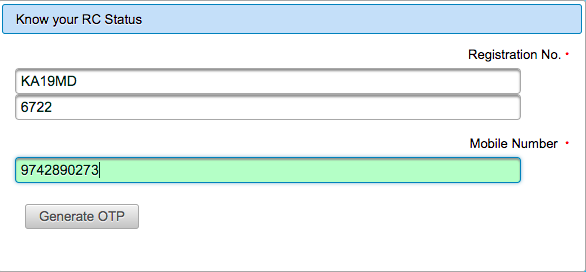
2. निम्न प्रकार से गाड़ी का नम्बर डालें और मोबाइल नम्बर डालें और 'Generate OTP' बटन पर क्लिक करें।

How do I get the owner's details from the vehicle registration number in India (Hindi)

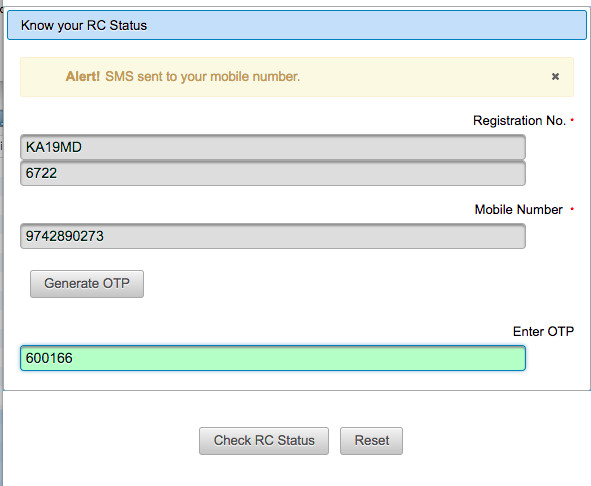
3. इसके बाद अपने मोबाइल पर आया हुआ, कोड निम्न स्क्रीन पर डालें और 'Check RC Status' पर क्लिक करें।

How do I get the owner's details from the vehicle registration number in India (Hindi)

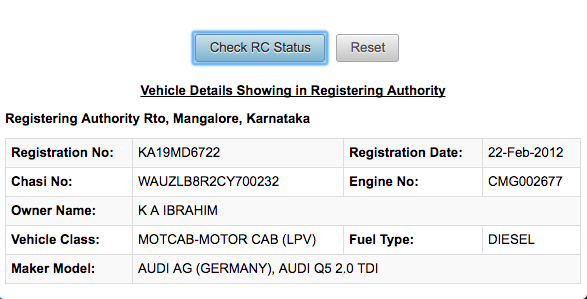
4. इसके बाद, उस गाड़ी नम्बर के मालिक और उस गाड़ी के रेजिस्ट्रेशन के विवरण की पूरी जानकारी आपकी स्क्रीन पर होगी।

How do I get the owner's details from the vehicle registration number in India (Hindi)


Read More
  • Share This:  
  •  Facebook
  •  Twitter
  •  Google+
  •  Stumble
  •  Digg
loading...

Friday, 16 December 2016

How To Find Serial Key / Cracks for Any Software (Hindi)

 Unknown     11:53     Hacking Tricks, How To, Information Zone, Other Tricks, PC Tricks, Special Tricks     No comments   

Find Serial Key / Cracks for Any Software !

Once Again i am back with a worth article for my pc members, This time i am going to explain you that how you can "Find Serial Key / Cracks for Any Software !".I assume that most of you use pirated software. Not everyone can afford buying a program like Photoshop, which costs $699. In this case you can use alternative, free software or you can download a pirated, cracked version of the program. There is a vast number of websites out there, where you can find serial numbers and cracks for any program, but most of them aren't safe to use. Actually most of them are spam sites that “bombard” you with full-screen popup ads, or commandeer your computer into a spam-loving Kraken  or Srizbi Botnet army. 
In this post I will show you the most efficient way of downloading cracks and serial numbers without any risk to your pc. This is the part of Hacking/Cracking using "Google hacking".
  
Finding Serial Key using Google :
To Get the serial number from google you have to just follow these steps :
  1. * Go to Google.
  2. * In the search field type : "Software name" 94FBR
  3. * Where, "Software Name" is the name of the item you want to find the serial number for.
  4. * And in google search Results you will get the list of all those websites where the serial key of the required software is available.Thats it !

HOW DOES THIS WORK ?
Quite simple really. 94FBR is part of a Office 2000 Pro cd key that is widely distributed as it bypasses the activation requirements of Office 2K Pro. By searching for the product name and 94fbr, you guarantee two things.
1) The pages that are returned are pages dealing specifically with the product you're wanting a serial for.
2) Because 94FBR is part of a serial number, and only part of a serial number, you guarantee that any page being returned is a serial number list page. 

See these example searches :

Search the following Keywords on Google :-
  1. "Photoshop 7" 94FBR
  2.  "Age of Mythology" 94FBR 
  3. "Nero Burning Rom 5.5" 94FBR


ऐसे पायें किसी भी Software के लिए उसकी Serial Key


जब हम किसी भी सॉफ्टवेयर को अपने फोन या कम्प्यूटर में जब डाउनलोड करके इंस्टॉल करते हैं तो अगर वो सॉफ्टवेयर फ्री वाला है तो अच्छा चलता है। लेकिन जब वह बिना रजिस्ट्रेशन के ना चले तो बात दिक्कत वाली हो जाती है। फिर आप इंटरनेट पर देखते हो उसे के बारे में और उसके क्रैक को। उसे हैक करने की तरकीब देखते हो।
अगर आज हम आपको ऐसी तरकीब बता दे जिस की मदद से हर सॉफ्टवेयर की सीरियल किज आपको बिना कहीं ज्यादा ढुढे ही मिल जायें तो कैसा रहेगा।
अगर देखा भी जाये तो लोग सर्च करके ऐसी कई प्रकार की वेबसाइट्स को ढुढं लेते हैं जहां से उन्हें वे सीरियल नम्बर मिल सकते हैं। हम आपको इससे भी सरल सा उपाय बतायेंगे।
नमस्कार दोस्तों स्वागत है आपका| आज हम आपको बतायेंगे की कैसे हम किसी भी सॉफ्टवेयर की सीरियल नम्बर कैसे पता लगाते हैं। आपको इस काम के लिए किसी अन्य प्रकार के सॉफ्टवेयर की भी आवश्यकता नहीं होगी। फिर भी आप सॉफ्टवेयर्स का सीरियल नम्बर पता कर सकते हैं। तो चलिए शुरू करते हैं।

इस ट्रिक के लिए आपको एक काम तो करना पडेगा। वो काम है आपको अपने वेबब्राउजर में गूगल की थोडी जरूरत जरूर होगी।

सॉफ्टवेयर के लिए सीरियल नम्बर जानने का आसान तरीका

1. ये टिप्स ज्यादा बडी़ नहीं है। इसके लिए आपको सबसे पहले अपने कम्प्यूटर के किसी भी एक वेबब्राउजर को खोलना होगा।
2. अब इसके अन्दर आपको गूगल को ओपन करना पडेगा और जब गूगल खुल जाये तो आपको इसमें केवल कुछ वर्डों को सर्च करना है।
3. गूगल आप सर्च बार के अंदर दो कोमो के अंदर उस सॉफ्टवेयर का नाम लिया दे और उसके बाद में आप 94FBR लिख दें। जैसे पहले सॉफ्टवेयर का नाम "सॉफ्टवेयर " 94FBR.
4. सिर्फ ये लिख कर आपको सर्च करना है। इसके बाद आपको जितने ऑप्शन मिलते हैं उनके नीचे आपको उस सॉफ्टवेयर की सभी सीरियल नम्बर लग जायेगी।
5. आप चाहे तो पहले उदाहरण के लिए किसी भी सॉफ्टवेयर को आजमा सकते हैं।
Read More
  • Share This:  
  •  Facebook
  •  Twitter
  •  Google+
  •  Stumble
  •  Digg
loading...

Thursday, 15 December 2016

How to Use Paytm Without Internet & Smartphone (Hindi)

 Unknown     10:21     How To, Recharge, Special Tricks, Tricks in Hindi     No comments   

How to Use Paytm Without Internet & Smartphone (Hindi)
Paytm has announced a toll-free number 1800-1800-1234 to enable consumers and merchants without an internet connection to pay and receive money instantly and also recharge their mobile phones. This will empower millions of non-smartphone users to go cashless even without a smartphone.

How to USE Paytm Offline Without Internet – 

Send Money Without Sending a Message

1. Create a PayTM account using either your smartphone or using a PC.
2. Add Money to PayTM wallet by Debit/Credit Card or Net banking.
How to Use Paytm Without Internet & Smartphone (Hindi)

That’s it for the setup to use PayTM offline! Now to send money to a phone number you need to follow these steps.

1. Call on 1800-1800-1234 toll-free number via your registered phone number in your PayTM account.
2. Now, your call will be disconnected and you will get a call from PayTM in few seconds.
3. For the first time, you need to setup a PIN for your safety.
4. After the PIN setup is completed.
5. Enter the desired mobile number you want to send money to and after that enter the amount; you want to send.
That is all you have to do for sending money to any PayTM user that too without using the internet!


Last Words:-

This is the best and safe method to Send money from Paytm to anyone Wallet without using the internet. This method lets the users access Paytm Without the internet. So, was this method helpful? If you face any problem regarding this trick. Then. do comment below and don’t forget to share this article with your friends.


How to Use Paytm Without Internet & Smartphone (Hindi)

बिना इंटरनेट के PayTM का प्रयोग कैसे करें

PayTM भारत का सबसे बड़ा डिजिटल वॉलेट एप है, जिसके माध्यम से आप अपने मोबाइल के माध्यम से रीचार्ज, बिल पेमेंट, शोपिंग और अन्य कई प्रकार के भुगतान कर सकते है।
अभी तक Paytm और इन जैसे किसी भी एप को प्रयोग करने के लिए आपको अपने मोबाइल पर इंटरनेट की आवश्यकता होती थी, लेकिन अब बिना इंटरनेट के भी PayTM को प्रयोग करने की सुविधा प्रारम्भ हो चुकी है।

आइए जानते है कि बिना इंटरनेट के PayTM का प्रयोग कैसे करें-

PayTM का बिना इंटरनेट उपयोग

1. PayTM मोबाइल पिन जेनरेट करें:

PayTM पर रेजिस्टर किए गए अपने मोबाइल नम्बर से 180018001234 पर कॉल करें तथा अपना चार अंकों का PayTM मोबाइल पिन जेनरेट करें

2. किसी को भी PayTM से पेमेंट करने के लिए

  1. इसके बाद जब भी आप किसी को पेमेंट करना चाहें तो 180018001234 पर कॉल करें
  2. जिसे पैसे भेजना चाहें उसका मोबाइल नम्बर और राशि डालें
  3. अपना PayTM पिन डाल कर कन्फ़र्म करें।
  4. आपका पेमेंट पूर्ण हो जाएगा।
Read More
  • Share This:  
  •  Facebook
  •  Twitter
  •  Google+
  •  Stumble
  •  Digg
loading...

Sunday, 4 December 2016

How to Compress any Images On Android Without Losing the images Quality

 Psk4u     17:33     Android Tricks, How To, Special Tricks     No comments   

Hi friends today i am going to telling you about a new application which will help you compress your images size and this is not reduce the quality of your image . so this app is going to help you to reduce the picture size and to crop the picture without losing the quality of your picture.many time we need the specified size in online application farms and job application farms so that time we need the application which will help you to compress the picture size. But when we compress the picture we found that we will  loose the quality of the picture. so i am going to telling about
How to Compress any Images On Android Without Losing the images Quality

How to Compress any Images On Android Without Losing the images Quality

  • In The first method your image will be automatically compressed and you don’t need to do anything 
  • In The second method is that you can choose your best settings this is the custom settings which will help you out to compress the images. You can choose your own quality and your own way of editing the images.

  • Download and install the Photo Compress 2.0 Ad-free version from here: <<<<<<<<Download>>>>>>>>
Compress Images On Android
  • Open the application and you will see 2 options in which camera and gallery. You can choose any way to edit the picture.
Compress Images On Android
  • Now, simply load the image and you will see an option of Quick Compress. Just click on it and your image will be compressed.
Compress Images On Android
  • Then click on Replace and Exit and then your image will be replaced with the old image. This makes it clean and doesn’t create too many images and folders.
  • If you want to compress the image manually according to your choice then you can do so with the help of the Compress Button. After loading the image this can be easily done without any issues.
  • Set the quality of the image and then done. This way you can easily compress the images on your Android device.
Compress Images On Android
Read More
  • Share This:  
  •  Facebook
  •  Twitter
  •  Google+
  •  Stumble
  •  Digg
loading...

How To Find Direct Link of Any Movie Using Google Dorks

 Psk4u     17:30     Hacking Tricks, How To, Information Zone, Special Tricks     4 comments   

Hello friends today i am telling you that How To Find Direct Link of Any Movie Using Google Dorks in google.this is very fast and simple to use.when we are using any website to download any movies there we find many fake downloading links and this waste our time and internet also.so please follow steps given below to download any movie directly.
How To Find Direct Link of Any Movie Using Google Dorks

What is Google Dork?

Google dork is very famous now a days this also known as google hacking.when we search any keywords in google search and then the result came out is from google dork.

write site:psk4u.blogspot.com in the Google search. The Google will do the rest here it is the same thing but in different manner. You can also read Wikipedia for more information about this by clicking here Dorks


  • You need a web-browser install any browser of your choice. Which ever you like in my case I am using Google Chrome.
  • Firstly, you need to open Google search from here – Google.com
  • Now, you need to enter the below code in the search box
Movie Name -inurl:(htm|html|php|pls|txt) intitle:index.of “last modified” (mp4|wma|aac|avi)
Direct Link Of Any Movie Using Google Dorks
  • In place of Movie Name. Just enter any of your favourite movie name which you want to download
For example
Conjuring -inurl:(htm|html|php|pls|txt) intitle:index.of “last modified” (mp4|wma|aac|avi)
Direct Link Of Any Movie Using Google Dorks
  • Now, click on search and you will see many search results in the list
Direct Link Of Any Movie Using Google Dorks
  • You can click on any search results of your choice and you will see below given screen
Direct Link Of Any Movie Using Google Dorks
  • Now, You can enjoy the high speed download of any movie in some clicks.

How Does The Works?

Movie Name -inurl:(htm|html|php|pls|txt) intitle:index.of “last modified” (mp4|wma|aac|avi)
In the above given keyword you will see a movie name there you can add any movie name for example conjuring, deadpool, and etc.
inurl(htm|html|php|pls|txt)
  • This means search the movie name in the URL. Most of the times there are name of the keywords given in the link itself, and it will search all the links which are having extensions named as htm, html, php, pls, txt.
intitle:index.of “last modified”
  • It means that this will search for the recent date when the file was uploaded, so that you can get the HD print of the movie and you can download it in blazing fast speed.
mp4|wma|aac|avi)
  • This is easy. Your movie will be searched which is having extension of mp4, wma, aac, avi format only. These sites are FTP (file transfer protocol) sites. Which is meant for downloading the files only.
Read More
  • Share This:  
  •  Facebook
  •  Twitter
  •  Google+
  •  Stumble
  •  Digg
loading...

Sunday, 27 November 2016

How to Find ATM Near You With Cash know full process

 Psk4u     10:21     How To, Information Zone     No comments   


Cashnocash.com, near atm finder website which have cash, how to know which atm have money or cash, know full process about how to find near atm counter with cash

How to Find ATM Near You With Cash know full process

Good news, now you can find which ATM have cash near you by just entering pin code number, that is called find atm with cash, let’s see how to find atm near you with cash

After banning 500, 1000 notes currency notes many peoples facing issue regarding cash, when you go any atm and stay in line by hours in hours later you see there is no cash any more, you feel very upset
So for helping peoples, recently launched an ATM finder website called cashnocash.com, by using this website you can see which atm have cash near you and you can also update if you know any atm which have cash or no cash.

How to find ATM near you with cash or no cash from cashnocash.com

Its too easy process to find atm near you with cash by just entering your area pin code number
Where is the ATM with cash? How long is the Queue in ATM? Cash or No Cash? For all these questions you have the answer here.

The website cashnocash.com update the real time status of the ATMs in the nearby neighborhood which has cash or not, through the crowd sourcing based on the user’s feedback and lets you know which of the ATMs have cash, which of them went dry and which of them have queues and how long they are.

Steps to find ATM near you with cash

  1. Go to cashnocash.com
  2. Enter your area pin code
  3. Click on Find Cash option
  4. Within few minutes you will get result
  5. Now you will see ATM near you which have cash.
So this is the easiest way to find ATM near you with cash, you can also download cashnocash android or ios from cashnocash.com or by clicking here

If you have any others questions regarding cashnocash.com website then just leave a comment.
Read More
  • Share This:  
  •  Facebook
  •  Twitter
  •  Google+
  •  Stumble
  •  Digg
loading...

Friday, 25 November 2016

How to Create Your Own Android Browser Without Coding

 Psk4u     10:47     How To, Special Tricks     No comments   

Now Create Your Own mobile Browser to surf with Maxthon  to Make Your Browser.  Maxthon Browser Create You Own browser for your mobile phone in android devices.

How to Create Your Own Android Browser Without Coding


Hello friends, today i am gonna to telling  you about  that How To Create  Android Browser Without Coding. So in this post i will show you how to create an android browser easily. You can now build and customize with  Maxthon mobile browser maker. This browser is now available for android.
now a Days We uses many kinds of Browsers like UC browser, Chrome, Mozila Firefox, Maxthon, Safari etc. But do you want to make your own browser > Yes it’s possible with very easy steps which is given below.
Today I will tech you How To Create Your Own Browser trick. With the given below trick you can easily create your own browser. Follow below to create your own browser.
This trick is for Android phones. If you want to create a browser for your Android browser just follow below steps.

How To Create Your Own Android Browser


  1.  First of all Go to This Page..
  2. Then Click the “Make It Now” button.
  3. after this Enter your browser name.
  4. After your name,  upload your own logo to be of 72 x 72px in size, JPG or PNG, < 50KB
  5. Now put browser’s homepage. Your own site or company url.
  6. After that upload a splash screen for your browser.
  7. At put your email, A link to download browser will be sent to your email.
  8. Now click on “Create Android Browser” Button.
  9. Once the creation process is completed, check your email inbox for the download link. Do check your spam folder as well. After downloading the app install on your Android phone.
  10. Enjoy with your own browser.
Read More
  • Share This:  
  •  Facebook
  •  Twitter
  •  Google+
  •  Stumble
  •  Digg
loading...

Saturday, 24 September 2016

How To Solve com.google.process.gapps has stopped unexpectedly

 Unknown     09:31     Android Tricks, How To     No comments   


What does the “process com.google.process.gapps has stopped” issue means?


As I mentioned, the process.gapps error appears when you try to run the Google Play Store on your Android device. This error might appear all of a sudden when the Play Store faces some technical issue on your device and therefore, you won’t be able to access it. This will make the store contents inaccessible and no apps or games can be installed on your phone.


What is Gapps?


Gapps means Google Applications which is included in Play Store, Google Calendar, Gmail and other Google apps.
It is not a custom ROM and most users need to install it if they contain a custom ROM without Gapps in it.


How to fix “com.google.process.gapps has stopped”?


Before recommending any fix, it is always advisable that a proper backup of your device should be taken in order to prevent data loss.


(1) Clear Application cache and data

If this error appeared after installing a particular app then you might need to clear your app cache and data. To perform this step,

• Go to your phone Settings > Apps > All.

• Scroll down to the app which was last installed before this error took place.

• Click on it > Clear cache and data.

In case, the above method fails to work, then try uninstalling that app.


(2) Reset App preferences


The following method will make the Play Store functional once again and prevent it from crashing.

Go to Settings > Apps > All.

• Now tap on the options menu (the three dots) on the top right corner of the screen.

• Click on Reset App Preferences > Reset Apps.


(3) Fix the Google Play Services


The com.google.process.gapps has stopped issue might also be a Google Play Services related problem. It might occur after you have flashed a custom ROM or have updated your Android operating system. If you are getting this trouble along with the “Google Play Services has stopped” issue them try following the steps below:

• Go to Settings > Accounts > Google > Remove your Gmail account.

• Go to Settings again > Apps > All.

• Scroll down to select Google Play  Services > clear Cache and data.

• Go back to Settings > Apps > All.

• Scroll down to select Google Play Store > clear Cache and data.

• Again go back to Settings > Apps > All.

• Scroll down to select Google Play Services Framework> clear data and uninstall updates.

• Click on OK in case any pop-up box appears.

• Go back to Settings > Accounts > Add Account > Select Google.

• Add your Gmail account again and follow the steps.

• Now open the Google Play Store > find and update Google Play Services.


(4) How to fix the “com.google.process.gapps has stopped” error for custom ROM’s?


To make sure you have installed the right version of Gapps on your system, you need to reflash the Gapps on custom ROM’s like Cyanogenmod, SlimRoms, Paranoid Android Omni, Pac ROM, etc. whichever you use. In case the above
troubleshoots fail to work, try this on:

• Reflash the Gapps with ClockWorkMod ROM Manager.

• Check the md5 value to confirm you have downloaded the accurate and complete .zip file.

• After reflashing Gapps, repeat the Method 4 above.
Read More
  • Share This:  
  •  Facebook
  •  Twitter
  •  Google+
  •  Stumble
  •  Digg
loading...
Older Posts Home

Popular Posts

  • Airtel New 3G 4G Free Internet Trick With Universal VPN Revision Handler - February 2017
    Airtel New 3G 4G Vpn Trick With Universal Vpn Handler.  I am back here with new airtel free internet vpn trick with universal vpn hand...
  • How To Hack Password Protected .Rar Files
    How To Hack Password Protected .Rar Files   Today we post Method Trick to Unlock or extract password protected .rar or winrar files....
  • Trick To Use Unlimited Data In Tunnel Guru Without Tunnel Guru Premium Account [February 2016]
    Now trending is the Airtel DNS trick. Tunnelguru has the easy interface that provides DNS tunneling . It provides 150mb/ ...
  • Trick To Hack Airtel Digital Tv - Watch Channels For Free
    Steps For Airtel Digital TV Hack Trick to Watch Free Channels :- First of All, Press Menu Button on your Airte...
  • Best Facebook Auto Liker Sites 2017
    Best Facebook Auto Liker Sites List For Get Free Unlimited Facebook Likes. Facebook auto liker tools are used by many facebook users fo...
  • How do I get the owner's details from the vehicle registration number in India (Hindi)
    Ministry of Road Transport and Highways has developed search systems accessible through both SMS and Web for the use of Common Citizen...
  • How to Get Unlimited Friend Request on facebook
    How to Get Unlimited Friend Request on facebook without any blocking issue.This is safe trick to get friend requests Now Facebook...
  • Android Pattern Lock Can Be Cracked In Just 5 Attempt: Here's how
    The popular pattern lock system used to secure millions of Android smartphones can be cracked within just five attempts - and more comp...
  • Uptobox Free Premium Account {Openly Posted} - Valid Till November 2016
    Uptobox.com launch Uptostream.com. You can now stream your files and they are available in HD (360p, 480p, 720p, 1080p) on al...
  • How To Make Unlimited Fake Accounts In Droid VPN For Unlimited Usage Without Premium Account
    Hello Friends, Today Am Sharing This Secret Trick To make Unlimited Droid Vpn Fake Accounts.  Droid Vpn gives only 100mb Bandwidth Limit P...

Categories

  • Android Tricks
  • Blogging Tricks
  • Earn Money Online
  • Facebook Tricks
  • Free
  • Free Internet Data
  • Hacking Tricks
  • How To
  • Information Zone
  • Network Tricks(Airtel)
  • Network Tricks(Other)
  • Online Shopping
  • Opera Tricks
  • Other Tricks
  • PC Tricks
  • Premium Accounts
  • Promo Codes
  • Recharge
  • Reliance Tricks
  • Special Tricks
  • Tech News
  • Tricks in Hindi
  • Troid VPN
  • Tutorials
  • Unlimited
  • Whats App
@PSK4U. Powered by Blogger.

Translate

Protected by Copyscape

Join Us On Facebook

Join Us On Facebook
Like Us On Facebook

Copyright © TECH ADVICE | Powered by Blogger
Design by Pushpendra Singh Koshyari |