TECH ADVICE

Science and Technology

  • Home
  • Sitemap
  • About Us
  • Privacy Policy
  • Contact Us
  • Home
Showing posts with label Information Zone. Show all posts

Saturday, 28 January 2017

Android Pattern Lock Can Be Cracked In Just 5 Attempt: Here's how

 Psk4u     12:01     Hacking Tricks, How To, Information Zone, Tech News     2 comments   

Android Pattern Lock Cracked
The popular pattern lock system used to secure millions of Android smartphones can be cracked within just five attempts - and more complicated patterns are the easiest to crack, security experts have warned. Pattern lock is a security measure that protects devices, such as mobile phones or tablets, and which is preferred by many to PIN codes or text passwords. It is used by around 40 per cent of Android device owners, researchers said.

In order to access a device's functions and content, users must first draw a pattern on an on-screen grid of dots. If this matches the pattern set by the owner then the device can be used. However, users only have five attempts to get the pattern right before the device becomes locked. New research from Lancaster University, University of Bath in the UK and the Northwest University in China, shows for the first time that attackers can crack pattern lock reliably within five attempts by using video and computer vision algorithm software.

By covertly videoing the owner drawing their pattern lock shape to unlock their device, while enjoying a coffee in a busy cafe for example, the attacker, who is pretending to play with their phone, can then use software to quickly track the owner's fingertip movements relative to the position of the device. Within seconds the algorithm produces a small number of candidate patterns to access the Android phone or tablet.

The attack works even without the video footage being able to see any of the on-screen content, and regardless of the size of the screen, researchers said. Results are accurate on video recorded on a mobile phone from up to two and a half meters away - and so attacks are more covert than shoulder-surfing. It also works reliably with footage recorded on a digital SLR camera at distances up to nine meters away, they said.

Researchers evaluated the attack using 120 unique patterns collected from independent users. They were able to crack more than 95 per cent of patterns within five attempts. Complex patterns, which use more lines between dots, were easier to crack because they help the fingertip algorithm to narrow down the possible options. During tests, researchers were able to crack all but one of the patterns categorized as complex within the first attempt. They were able to successfully crack 87.5 per cent of median complex patterns and 60 per cent of simple patterns with the first attempt.
Researchers believe this form of attack would enable thieves to access phones after pinching them to obtain sensitive information, or would allow malware to be quickly installed on devices while their owners were distracted.

They have proposed suggested countermeasures to prevent this attack, which include device users fully covering fingers when drawing the pattern; or pattern lock designers mixing pattern locking with other activities such as entering a sentence using Swipe-like methods. Having the screen color
and brightness change dynamically could confuse the recording camera, researchers said.
Read More
  • Share This:  
  •  Facebook
  •  Twitter
  •  Google+
  •  Stumble
  •  Digg
loading...

Thursday, 26 January 2017

Top 15 Unique Uses of USB OTG Cable You Never Know – 2017

 Psk4u     16:21     Android Tricks, Information Zone     No comments   


Top 15 Unique Uses of USB OTG Cable You Never Know – 2017
USB On-The-Go (popularly known as USB OTG) is undoubtedly one of the coolest features of Android (although few other devices support it too). It’s a standard that allows USB OTG compatible devices (e.g. almost all modern Android devices) to act as “hosts” or controllers for other USB gadgets, such as keyboards/mice, flash drives, and even game controllers. This essentially means that Android devices don’t need a computer to act as host for interfacing with other USB devices, and act like mini-computers themselves.
Thanks to USB OTG, you can expand your Android smartphone’s functionality in numerous ways, and use it to do extremely cool things like accessing data stored on Flash drives, and even charging other phones. But is that all?
Not by a long shot, and that’s why this article rounds up some unique and cool USB OTG uses. But before we even get to the listing, here are some important things you need to keep in mind.

Top 15 Uses of USB OTG Cable You Never Know

#1 Pen Drive or Hard Drive or Flash Drive
Pen drive is one of the best and most used features of USB OTG Cable. Yes, you can connect your pen drives with your Android device and access all the data, and you can even copy, paste, modify, delete, straight from your phone. If your stock file manager does not work, go with ES File Explorer File Manager, these days pen drives come with OTG port so you don’t need any OTG cable now connect straight to the micro USB port and ready to go. A hard drive may not support all device.
USB OTG Cable
#2 USB or Bluetooth Keyboard 
You can even connect a keyboard to your Android phone, all you need to do is connect an OTG cable and plug in USB or Bluetooth keyboard and write down all your long notes and data very quickly with an external keyboard. It is as easy as using the keyboard with PC or laptop makes your work faster while using an android phone.
USB OTG Cable
#3 USB or Bluetooth Mouse
You can use external mice with your android phone all you need to do is connect an OTG cable and connect any USB or Bluetooth mouse, And you’re ready to go, you can see a cursor on your android screen and use mouse to do whatever you can do with your touch so this will be life saver for someone who got broken touch.
USB OTG Cable
#4 USB Fan
You may be thinking how is possible but YES! You can connect USB fan with OTG cable, and it will work as fine as it works with laptop or PC USB port. There are so many USB fans but if you want to get the best, and cheap go with MI USB fan that is best in this class.
USB OTG Cable
#5 Card Reader 
If your Android phone doesn’t support micro sd card, don’t worry this trick is for you can use Card reader and connect with your phone OTG cable, and you’re ready to rock. You can transfer, Modify or delete anything. You can even use DSLR cameras memory card and check all your stuff with the card reader.
USB OTG Cable
#6 Game Controller 
If you’re a game boy and like to play so many android games so this is the best thing you can ever get in Android gaming a gaming controller. You can get USB or Bluetooth gaming controller and connect with USB OTG cable, and you’re ready to play some heavy games like Asphalt and more that support external gaming pad.
USB OTG Cable
#7 USB Lamp Light or USB Fan
If you’re a PC geek, you may have used USB lamp or USB light that makes life easier for people who don’t have backlight keyboards. You can even use USB light with your Android device I suggest you get the MI light and MI Fan cheap best and easy to use and with excellent light and Superb Air.
USB OTG Cable
#8 USB LAN Cable
For some reasons if you want to connect your Android phone with LAN cable, it will be possible with the micro USB to LAN converter, and then you can use your LAN internet connection straight to your phone. There are two options from which you can choose micro to LAN or USB to LAN I suggest you to go with USB to LAN you can even use that device with PC too.
USB OTG Cable
#9 DSLR Camera
You can go way far with USB OTG, and you can even connect your DSLR camera for shutter control or other cool features. You have to download DSLR Controller app from play store. Now get the connect you camera USB cable and second connect USB OTG cable and now connect both your ready to go now you can control any DSLR camera from android app.

#10 Usb Sound Card
If your mobile’s sound jack is not working, or there is some problem with hardware we have an alternative method to play music in headphones. All need is a USB to sound jack that can solve your problem, Get a USB OTG cable and connect with USB sound card and connect your headphones to that card and you can listen to unmatched music.
USB OTG Cable
#11 Print Document
This is one of the most interesting use of OTG You can also print your papers and files that are on your phones all you need is connect your phone with OTG cable and connect another end to the printer and your ready to open any document or file and give a print command, and that’s all.
USB OTG Cable
# 12 Charge Other Phone
If you heard about this first time, don’t worry this is not fake and Yes you can charge another phone with the help of OTG cable with your phone. All you need to do is get an OTG cable and connect to the phone which is charged and connect to it and get another phone with the help of micro to USB cable and see the magic phone is started charging.
USB OTG Cable
#13 Chromecast or HDMI 
No matter you got smart TV or not but you can still mirror your Android screen to your home TV. All you need to have is an HDMI cable or ChromeCast and OTG cable to connect it to your phone and now connect it to your TV or LED in the USB port you’re all set you can share stuff see movies and more through this trick.
#14 Import Photos From Digital Camera
Their so many cameras and DSLR who don’t have Bluetooth or wifi file transfer so whenever you need to transfer the data you have to connect it to your PC or laptop but in case if you got Android smartphone with OTG Adapter you can transfer files to your phone. All you need to do is connect an OTG cable and connect it to the camera through DSLR USB cable your all set.USB OTG Cable

#15 Record Audio With External Microphone
If you are a youtube or anyone who use an external mic to record voice, this is the best trick for you. You can record your voice with the external mic on to the Android phone with the help of OTG cable.
USB OTG Cable

More with OTG Cable  
You can also create music with MIDI controller app and External music instruments.
You can create Micro USB to USB type-c, Or you can say if USB OTG is feature is available on your Android phone this can be power hub you can do way more tweaks with it, and in future, there will be more tricks and gadgets to use with OTG,
That are the Top 15 Uses of USB OTG Cable You Never Know. So what are you waiting for get an OTG cable and try out all the tricks mention there and if you found something more interesting that can be on this list don’t forget to mention the comments below?
Read More
  • Share This:  
  •  Facebook
  •  Twitter
  •  Google+
  •  Stumble
  •  Digg
loading...

Saturday, 14 January 2017

Idea Welcome Offer 2017 – Get 4GB 4G Data + Unlimited Calling For 12 Months

 Psk4u     12:22     Free Internet Data, Information Zone, Network Tricks(Other)     No comments   

  Idea Welcome Offer 2017 – Get 4GB 4G Data + Unlimited Calling For 12 Months

Now Idea has also come up with super Plans for new users where they are giving unlimited Local/STD calling bundled with free data. The New Idea Welcome Offer bundles 4G data for existing as well as new prepaid 4G handset customers. Existing users will get 1GB of data on Rs.348 recharge pack, in addition to unlimited voice calling and messaging. For new users under Idea Welcome Offer, users with new 4G handset will get additional 3GB data apart from unlimited calling and messaging. The benefits will be valid for 28 days and can only be availed for a maximum of 12 times in a year. 
Idea Welcome Offer 2017 – Get 4GB 4G Data + Unlimited Calling For 12 Months
 

How To Activate Idea Welcome Offer 2017:-

  • Download The My Idea App From Here.
  • Register for a account with your Idea number.
  • Now initiate a recharge of Rs.348 or according to your desired plan.
  • Make sure to be on a 4G reception with 4G enabled smartphone to avail the offer.
  • Proceed to complete the transaction.
  • Complete the payment with Debit/Credit card.
  • And done! Idea Welcome Offer bundled with free calling and messaging will be activated. Donate car. Because car donating is trending these days. Donate a car and be a hero..

Idea Welcome Offer Plans And Details:-

Idea Rs.348 Prepaid Plans

  • Existing prepaid 4G handset users will get 1GB of data on Rs.348 recharge.
  • Bundled with additional unlimited voice calling and messaging.
  • Users with new 4G handset will get additional 3GB data.
  • The benefits of Rs.348 plan will be valid for 28 days.
  • Customers can avail this offer 12 times a year only.

Idea Rs.499 Postpaid Plan

  • Idea postpaid customers subscribing to Rs.499 monthly rental plan will get unlimited local, national and incoming roaming calls.
  • Bundled with 3GB 4G data on 4G handset.
  • Non-4G handset users will get unlimited calling benefits and 1GB free data.
  • The benefits of Rs.499 plan will be valid for 28 days.
  • Customers can avail this offer 12 times a year only.

Idea Postpaid Rs.999 Plan

  • Idea postpaid users with monthly rental plan will get all benefits of Rs 499 plan
  • Apart from this, they will be able to make free calls on roaming as well.
  • 4G Handset users will get 8GB of high speed 4G data.
  • Non-4G enabled handsets will get 5GB of data bandlimited to maximum speed in their area.
  • The benefits of Rs.999 plan will be valid for 28 days.
  • Customers can avail this offer 12 times a year only.
Read More
  • Share This:  
  •  Facebook
  •  Twitter
  •  Google+
  •  Stumble
  •  Digg
loading...

Sunday, 8 January 2017

Simple Trick to Download Any Torrent Files In Any Browsers

 Psk4u     17:02     Android Tricks, How To, Information Zone, Special Tricks     No comments   

 Simple Trick to Download Any Torrent Files In Any Browsers

Torrents are one of the most popular forms of file sharing on the internet, accounting for over 50% of all internet traffic. However it might be difficult for the newcomers to getting into the torrent scene. Many of us uses uTorrent app to download torrent files, If you’re feeling lazy to switch between your web browser and torrent app, here’s a solution to download torrent files within your favorite browser. So lets proceed and check detailed info about how to to download torrent files within any browser.

 
Simple Trick to Download Any Torrent Files In Any Browsers

How to Download Torrent Files Within Browser?

1. First of all visit this website – Seedr.cc

2. Now click on Sign Up and enter your email and password, tick on terms and conditions and click register with email (Or simply you can sign-up with your facebook account)

3. Now you will see a page like below


Simple Trick to Download Any Torrent Files In Any Browsers

4. Copy any torrent file link or magnet link.

5. Now tap on” +” icon and paste torrent or magnet link and again tap “+” icon.
6. Now you will see torrent has been downloaded in seedr.cc


Simple Trick to Download Any Torrent Files In Any Browsers


7. Now click on the folder and tap on download.

8. Done!! Your torrent file will start downloading within browser


Tags:-Trick to Download Any Torrent Files in india,Trick to Download Any Torrent Files directly,Trick to Download Any Torrent Files in usa, Download Any Torrent Files,how to Download Any Torrent Files
Read More
  • Share This:  
  •  Facebook
  •  Twitter
  •  Google+
  •  Stumble
  •  Digg
loading...

Tuesday, 3 January 2017

BHIM App Download: UPI, USSD Payment App by Modi (Hindi)

 Psk4u     07:18     Android Tricks, Information Zone, Recharge     No comments   

Here we have covered everything you need to know about BHIM, the UPI enabled app from NPCI launched by Prime Minister Narendra Modi at the Digi Dhan Mela event in New Delhi. BHIM which stands for “Bharat Interface for Money” is live for use now. BHIM App is an approach by Government of India to ease the process of digital payment and strengthen the cashless society.


How and where to Download BHIM app?

BHIM app is a free application which can be download with respective stores for now BHIM app is only available for Android Smartphone users and soon it will be available for various smartphones operating system such as IOS, Windows, Blackberry etc. Below are the steps one need to follow to download BHIM app on your smartphones:
DOWNLOAD BHIM APP CLICK HERE


How to Use Bhim App for Payment?


1. Download BHIM Apk [Google Play Store Link] and install it on your phone.
2. Open app and set PIN for the app.
3. Enter your mobile number (which is registered with your Bank)
4. Now select the Bank and application will auto detect your account via Mobile number.
5. Enter card details to verify your account.
6. Now you will be either asked to choose UPI PIN or if you already have one UPI VPA then process will end.


Features of BHIM Android App


1. Send / Receive Money: Send money to or receive money from friends, family and customers through a mobile number or payment address. Money can also be sent to non UPI supported banks using IFSC and MMID. You can also collect money by sending a request and reverse payments if required.
2. Check Balance: You can check your bank balance and transactions details on the go.
3. Custom Payment Address: You can create a custom payment address in addition to your phone number.
4. QR Code: You can scan a QR code for faster entry of payment addresses. Merchants can easily print their QR Code for display.
5. Language supported: Hindi and English. More languages coming soon!

What is the transaction limit on the BHIM app?

With BHIM app one can transfer up to Rs. 10,000 per transaction and up to Rs. 20,000 in a day.

Banks listed under BHIM app?

Allahabad Bank
Andhra Bank
Axis Bank
Bank of Baroda
Bank of India
Bank of Maharashtra
Canara Bank
Catholic Syrian Bank
Central Bank of India
DCB Bank
Dena Bank
Federal Bank
HDFC Bank
ICICI Bank
IDBI Bank
IDFC Bank
Indian Bank
Indian Overseas Bank
IndusInd Bank
Karnataka Bank
Karur Vysya Bank
Kotak Mahindra Bank
Oriental Bank of Commerce
Punjab National Bank
RBL Bank
South Indian Bank
Standard Chartered Bank
State Bank of India
Syndicate Bank
Union Bank of India
United Bank of India
Vijaya Bank

चलिए जानते हैं कि कैसे करें BHIM एप्प का इस्तेमाल और उठाये इस सुविधा का भरपूर लाभ:
1. सबसे पहले आपको बता दें कि इस एप्प का लाभ सिर्फ एंड्राइड यूज़र्स ही उठा सकतें हैं, अन्य ऑपरेटिंग सिस्टम जैसे iOS पर यह अभी उपलब्ध नहीं है। इस एप्प को आप प्लेस्टोर से डाउनलोड कर लें।
2. एप्प को ओपन करते ही यह आपसे भाषा के चयन के लिए विकल्प देगा। फ़िलहाल हिंदी और अंग्रेजी फ़ो ही भाषाओं का विकल्प है।
3. अपनी पसंदीदा भाषा चुनने के बाद यहाँ आपका मोबाइल नंबर पूछा जायेगा और फिर कन्फर्मेशन के लिए OTP भी आएगी। आपसे आग्रह है कि इस एप्प में रजिस्ट्रेशन के वक़्त वही नंबर डालें जो आपके बैंक के खाते से जुड़ा हो।
4. अब एप्प में आपसे 4 डिजिट का पासकोड पुछा जायेगा, जो आगे की सभी लेन-देन में काम करेगा, तो कृपया अपना पासकोड सावधानी से डालें और उसे याद रखें।
5. पासकोड नंबर कन्फर्म हो जाने पर आप अपना प्राइमरी बैंक चुन लें, मान ले आपके पास अगर एक से ज्यादा खाते हैं तो आपको एप्प में चुनना होगा कि आप किस खाते से लेन-देन करना चाहतें हैं।
6. इसके बाद आप अपने खाते में पैसे ले और दे सकतें है, लेकिन अभी एक स्टेप और है, जो बेहद अहम् है।
7.बैंक खाता पर क्लिक करें और अपना UPI पिन सेट करें।
8. अब आप सिर्फ M-पिन की आवश्यकता पड़ेगी जो एक खाते से दूसरे खाते में पैसे की लेनदेन के लिए जरुरी है। यह 4 से 6 डिजिट का कोड होता है, जो ट्रांसेक्शन के वक़्त पूछा जाता है।
* अब आप भेजें विकल्प पर क्लिक कर के किसी के भी मोबाइल नंबर को और अमाउंट को डाल कर पैसे भेज सकतें हैं।
* प्राप्त करें पर क्लिक कर के आप किसी से भी अमाउंट लेने के लिए आग्रह कर सकतें हैं।
* तीसरा विकल्प स्कैन और पे इससे पहले आपने देखा होगा की लोग Paytm की मदद से QR कोड स्कैन कर के आसानी से अपने मोबाइल वॉलेट से भुगतान करते थे।

NOTE:-

If you have any questions regarding
BHIM app then feel free to comment below and we will get back to you asap.

Don’t forget to share this with your friends on social media and educate them with this new initiative by PM Narendra Modi Ji. Thanks for reading. :)
Read More
  • Share This:  
  •  Facebook
  •  Twitter
  •  Google+
  •  Stumble
  •  Digg
loading...

Thursday, 29 December 2016

Change your IP in less than 1 minute

 Psk4u     17:30     Information Zone, PC Tricks, Special Tricks     No comments   

Change your IP in less than 1 minute

Hey! Today i am gonna tell you that how to change any IP address in less than a minute And one more thing .Sorry for The Late Post because Now a days i am very busy in Study. 
 
SO HERE WE GO

NOTE:- PUT ONE THING IN MIND ALL TRICKS ARE FOR EDUCATIONAL PURPOSE ONLY ..SO BE SMART AND DON'T TRY IN HACKING OR CRACKING.

Here is the 10 most easy quick step method to changethe IP address by changing the properties in LAN (Local Area Netwok):-


Step 1:Click on "Start"→ "Run"  Then Type in "command" or "cmd" and hit OK or press ENTER.
Step 2: In the Command Prompt also known as "MS-DOS" prompt just type "ipconfig /release" & Hit Enter.
Type "exit" and leave the prompt
Step3 :Right-click on "Network Places" or "My Network Places" ---> Click on "properties" .Then Right click on"Local Area Connection"--->Click"properties"
Step 4:Now click on the "Internet Protocol (TCP/IP)" from the list under the "General" tab
Step 5: Click on "Use the following IP address" under the "General" tab
Cool ...Now you can type in your own IP address .
Step 6:Now Press "Tab" and it should automatically fill in the"Subnet Mask" section with default numbers.
Step 7:Hit the "Ok" button twice and you are now back to the"Local Area Connection" screen.
Step 8:Now Right-click back on "Local Area Connection" and go to properties again.
Step 9:Go back to the "TCP/IP" settingsNow , Select "Obtain an IP address automatically"
Step 10:Hit "Ok" twice again
YO...now you have a new IP address However it only changes yourdynamic IP address and not not your ISP/IP address.

Hope you enjoyed this post.....

Read More
  • Share This:  
  •  Facebook
  •  Twitter
  •  Google+
  •  Stumble
  •  Digg
loading...

Saturday, 17 December 2016

How do I get the owner's details from the vehicle registration number in India (Hindi)

 Psk4u     12:40     How To, Information Zone, Tricks in Hindi     1 comment   


Ministry of Road Transport and Highways has developed search systems accessible through both SMS and Web for the use of Common Citizen to be provided free of cost. To get the details using SMS a person will have to use.

For RC Statius Check: VAHAN <registration no>
and send the SMS to 7738299899
Example: VAHAN DL3CAP9473 → 7738299899
Details will come by return SMS

For DL Status Check: SARDL <driving licence no.>
and send the SMS to 8790499899
Example: SARDL AP26 19860001659 → 8790499899
Details will come by return SMS
for detail by using web include Chasis No. and Engine of vehicle confirm the genuness of RC. The details are given in the website

To get the limited status information related to any vehicle on the web:
Open the parivahan portal: Parivahan Sewa, 
Click on the menu option: Online Services. Under Vahan Tab, 
click on the option “Know your RC Status” In the next screen, feed the Vehicle Registration No. in the given Box. 
Registration Status will be shown immediately. 

Alternatively,
 Open the Vahan Portal: VAHAN 
Click on the Menu Option: Vehicle Status” In the next screen, 
feed the Vehicle Registration No. in the given Box. Registration Status will be shown immediately.

To get the limited status information related to any Driving License on the web:

Open the parivahan portal: Parivahan Sewa, 
Click on the menu option: Online Services. Under Sarathi Tab, 
click on the option “Know your DL Status” 
In the next screen, feed the Driving License No. in the given Box. 
License Status will be shown immediately.


Alternatively,

Open the Sarathi portal: http://sarathi.nic.in, Click on the menu option: Status of License. These detail are being provided to ascertain existence in the RC/DL record in the Transport National Registry maintained by NIC on behalf of the Ministry of Road Transport & Highways. While the NIC has attempted to include all data from all the states, there may be some omissions and in such case citizen can contact concerned RTO for conclusive verification of genuineness of the data.

गाड़ी नम्बर से मालिक और गाड़ी के रेजिस्ट्रेशन की जानकारी ऐसे हासिल करें

यदि आप किसी भी गाड़ी के नम्बर से उस गाड़ी के मालिक और उसके रेजिस्ट्रेशन की जानकारी हासिल करना चाहते है, तो आइए जानते है उसका तरीक़ा।


गाड़ी के नम्बर से मालिक और गाड़ी की अधिक जानकारी

1.  भारत सरकार की परिवहन सेवा की इस ऑनलाइन सेवा पर जाएँ

https://parivahan.gov.in/rcdlstatus/?pur_cd=102


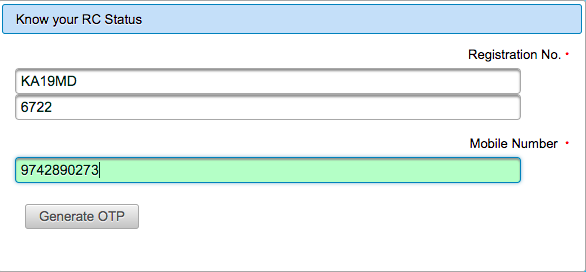
2. निम्न प्रकार से गाड़ी का नम्बर डालें और मोबाइल नम्बर डालें और 'Generate OTP' बटन पर क्लिक करें।

How do I get the owner's details from the vehicle registration number in India (Hindi)

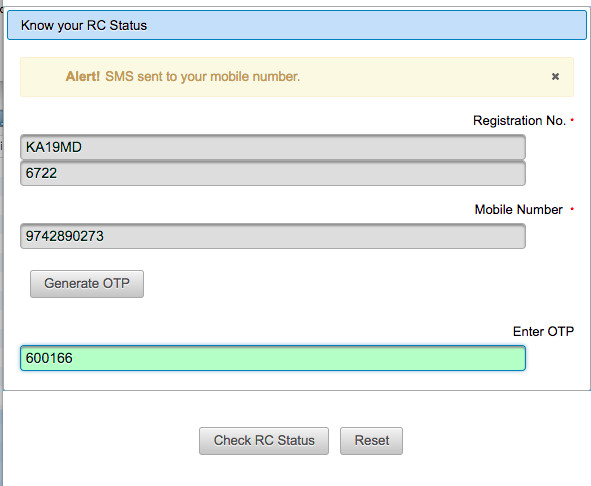
3. इसके बाद अपने मोबाइल पर आया हुआ, कोड निम्न स्क्रीन पर डालें और 'Check RC Status' पर क्लिक करें।

How do I get the owner's details from the vehicle registration number in India (Hindi)

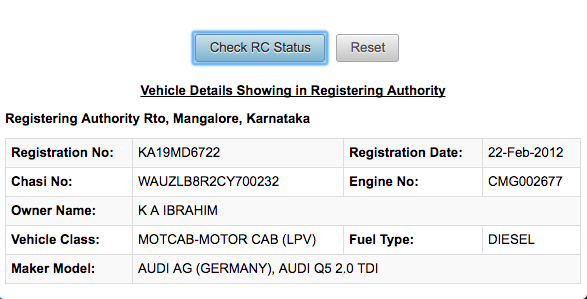
4. इसके बाद, उस गाड़ी नम्बर के मालिक और उस गाड़ी के रेजिस्ट्रेशन के विवरण की पूरी जानकारी आपकी स्क्रीन पर होगी।

How do I get the owner's details from the vehicle registration number in India (Hindi)


Read More
  • Share This:  
  •  Facebook
  •  Twitter
  •  Google+
  •  Stumble
  •  Digg
loading...

Friday, 16 December 2016

How To Find Serial Key / Cracks for Any Software (Hindi)

 Unknown     11:53     Hacking Tricks, How To, Information Zone, Other Tricks, PC Tricks, Special Tricks     No comments   

Find Serial Key / Cracks for Any Software !

Once Again i am back with a worth article for my pc members, This time i am going to explain you that how you can "Find Serial Key / Cracks for Any Software !".I assume that most of you use pirated software. Not everyone can afford buying a program like Photoshop, which costs $699. In this case you can use alternative, free software or you can download a pirated, cracked version of the program. There is a vast number of websites out there, where you can find serial numbers and cracks for any program, but most of them aren't safe to use. Actually most of them are spam sites that “bombard” you with full-screen popup ads, or commandeer your computer into a spam-loving Kraken  or Srizbi Botnet army. 
In this post I will show you the most efficient way of downloading cracks and serial numbers without any risk to your pc. This is the part of Hacking/Cracking using "Google hacking".
  
Finding Serial Key using Google :
To Get the serial number from google you have to just follow these steps :
  1. * Go to Google.
  2. * In the search field type : "Software name" 94FBR
  3. * Where, "Software Name" is the name of the item you want to find the serial number for.
  4. * And in google search Results you will get the list of all those websites where the serial key of the required software is available.Thats it !

HOW DOES THIS WORK ?
Quite simple really. 94FBR is part of a Office 2000 Pro cd key that is widely distributed as it bypasses the activation requirements of Office 2K Pro. By searching for the product name and 94fbr, you guarantee two things.
1) The pages that are returned are pages dealing specifically with the product you're wanting a serial for.
2) Because 94FBR is part of a serial number, and only part of a serial number, you guarantee that any page being returned is a serial number list page. 

See these example searches :

Search the following Keywords on Google :-
  1. "Photoshop 7" 94FBR
  2.  "Age of Mythology" 94FBR 
  3. "Nero Burning Rom 5.5" 94FBR


ऐसे पायें किसी भी Software के लिए उसकी Serial Key


जब हम किसी भी सॉफ्टवेयर को अपने फोन या कम्प्यूटर में जब डाउनलोड करके इंस्टॉल करते हैं तो अगर वो सॉफ्टवेयर फ्री वाला है तो अच्छा चलता है। लेकिन जब वह बिना रजिस्ट्रेशन के ना चले तो बात दिक्कत वाली हो जाती है। फिर आप इंटरनेट पर देखते हो उसे के बारे में और उसके क्रैक को। उसे हैक करने की तरकीब देखते हो।
अगर आज हम आपको ऐसी तरकीब बता दे जिस की मदद से हर सॉफ्टवेयर की सीरियल किज आपको बिना कहीं ज्यादा ढुढे ही मिल जायें तो कैसा रहेगा।
अगर देखा भी जाये तो लोग सर्च करके ऐसी कई प्रकार की वेबसाइट्स को ढुढं लेते हैं जहां से उन्हें वे सीरियल नम्बर मिल सकते हैं। हम आपको इससे भी सरल सा उपाय बतायेंगे।
नमस्कार दोस्तों स्वागत है आपका| आज हम आपको बतायेंगे की कैसे हम किसी भी सॉफ्टवेयर की सीरियल नम्बर कैसे पता लगाते हैं। आपको इस काम के लिए किसी अन्य प्रकार के सॉफ्टवेयर की भी आवश्यकता नहीं होगी। फिर भी आप सॉफ्टवेयर्स का सीरियल नम्बर पता कर सकते हैं। तो चलिए शुरू करते हैं।

इस ट्रिक के लिए आपको एक काम तो करना पडेगा। वो काम है आपको अपने वेबब्राउजर में गूगल की थोडी जरूरत जरूर होगी।

सॉफ्टवेयर के लिए सीरियल नम्बर जानने का आसान तरीका

1. ये टिप्स ज्यादा बडी़ नहीं है। इसके लिए आपको सबसे पहले अपने कम्प्यूटर के किसी भी एक वेबब्राउजर को खोलना होगा।
2. अब इसके अन्दर आपको गूगल को ओपन करना पडेगा और जब गूगल खुल जाये तो आपको इसमें केवल कुछ वर्डों को सर्च करना है।
3. गूगल आप सर्च बार के अंदर दो कोमो के अंदर उस सॉफ्टवेयर का नाम लिया दे और उसके बाद में आप 94FBR लिख दें। जैसे पहले सॉफ्टवेयर का नाम "सॉफ्टवेयर " 94FBR.
4. सिर्फ ये लिख कर आपको सर्च करना है। इसके बाद आपको जितने ऑप्शन मिलते हैं उनके नीचे आपको उस सॉफ्टवेयर की सभी सीरियल नम्बर लग जायेगी।
5. आप चाहे तो पहले उदाहरण के लिए किसी भी सॉफ्टवेयर को आजमा सकते हैं।
Read More
  • Share This:  
  •  Facebook
  •  Twitter
  •  Google+
  •  Stumble
  •  Digg
loading...

Sunday, 11 December 2016

Check your smartphone, you may not be able to use WhatsApp in 2017 (Hindi)

 Unknown     13:05     Information Zone, Tricks in Hindi, Whats App     2 comments   


Check your smartphone, you may not be able to use WhatsApp in 2017 (Hindi)


Earlier this year, WhatsApp announced that it would end support for some of the older smartphones by the end of 2016. The company will phase out these devices as it plans to focus efforts on the mobile platforms which majority of people use.

WhatsApp mentioned in its blog post, “While these mobile devices have been an important part of our story, they don't offer the kind of capabilities we need to expand our app's features in the future.”

WhatsApp Messenger will no longer work on the following mobile platforms:

- BlackBerry OS and BlackBerry 10
- Nokia S40
- Nokia Symbian S60
- Android 2.1 and Android 2.2
- Windows Phone 7
- iPhone 3GS/iOS 6

The company added, “While these mobile devices have been an important part of our story, they don't offer the kind of capabilities we need to expand our app's features in the future.” However, WhatsApp stated that it is extending support for BlackBerry OS, BlackBerry 10, Nokia S40 and Nokia Symbian S60 until June 30, 2017.


व्हाट्सएप्प ने बनाई सूची, नए साल से इन स्मार्टफोन्स में नहीं चलेगा व्हाट्सएप्प... कही आपका फ़ोन तो नहीं है इस लिस्ट में?

स्मार्टफोन्स में तेज़ी से आते बदलाव और सॉफ्टवेयर अपडेशन के मद्दे नज़र व्हाट्सएप्प ने कुछ स्मार्टफोन्स की सूची बनायी है, जिन्हें वह भविष्य में सपोर्ट नहीं करेगा। चूंकि, व्हाट्सएप्प आये दिन नित नए फीचर्स को ट्राई और टेस्ट कर रहा है, हाल ही में व्हाट्सएप्प में वीडियो कॉल टेस्टिंग की भी पुष्टि की। ऐसे में पुराने हार्डवेयरों पर व्हाट्सएप्प इनका सपोर्ट बंद कर रहा है।

व्हाट्सएप्प ने हाल ही की अपनी आधिकारिक घोषणा में कहा कि, हम अपने व्हाट्सएप्प यूज़र्स के लिए कई बेहतरीन फीचर्स लेकर आ रहे है और हमें बड़े कष्ट के साथ कुछ स्मार्टफोन्स को अपनों सूची से निकलना पद रहा है, हालाँकि व्हाट्सएप्प के विकास में इन स्मार्टफोन्स का काफी योगदान रहा है। लेकिन अपने यूज़र्स के बेहतर एक्सपीरियंस के लिए हमें यह ठोस कदम उठाना पड़ रहा है।

कही आपको भी तो नहीं लेना पड़ेगा न्य स्मार्टफोन व्हाट्सएप्प चलाने के लिए..?


तो ये है वो स्मार्टफोन्स जिनमे 31 दिसम्बर के बाद व्हाट्सएप्प नहीं चलेगा-

नोकिया सिम्बियन एस60

एंड्राइड 2.1 और 2.2

विंडोज 7.1 और उससे पुराने वर्जन

आईफोन 3जीएस/ आईओएस 6

ब्लैकबेरी ओएस और सभी ब्लैकबेरी फ़ोन्स


तो अगर आपका फ़ोन ऊपर दी गयी सूची में है, तो तैयार हो जाइये एक नया स्मार्टफोन लेने के लिए अगर आपको व्हाट्सएप्प का इस्तेमाल करना है तो.... वहीं दूसरी तरफ एंड्राइड यूज़र्स के पास अपना फ़ोन रुट करके ऑपरेटिंग सिस्टम अपग्रेड करने का भी विकल्प है। आपको बता दें कि सिम्बियन पहला ऑपरेटिंग सिस्टम था जिनपर व्हाट्सएप्प चलाया जा सकता था।
Read More
  • Share This:  
  •  Facebook
  •  Twitter
  •  Google+
  •  Stumble
  •  Digg
loading...

Sunday, 4 December 2016

How To Find Direct Link of Any Movie Using Google Dorks

 Psk4u     17:30     Hacking Tricks, How To, Information Zone, Special Tricks     4 comments   

Hello friends today i am telling you that How To Find Direct Link of Any Movie Using Google Dorks in google.this is very fast and simple to use.when we are using any website to download any movies there we find many fake downloading links and this waste our time and internet also.so please follow steps given below to download any movie directly.
How To Find Direct Link of Any Movie Using Google Dorks

What is Google Dork?

Google dork is very famous now a days this also known as google hacking.when we search any keywords in google search and then the result came out is from google dork.

write site:psk4u.blogspot.com in the Google search. The Google will do the rest here it is the same thing but in different manner. You can also read Wikipedia for more information about this by clicking here Dorks


  • You need a web-browser install any browser of your choice. Which ever you like in my case I am using Google Chrome.
  • Firstly, you need to open Google search from here – Google.com
  • Now, you need to enter the below code in the search box
Movie Name -inurl:(htm|html|php|pls|txt) intitle:index.of “last modified” (mp4|wma|aac|avi)
Direct Link Of Any Movie Using Google Dorks
  • In place of Movie Name. Just enter any of your favourite movie name which you want to download
For example
Conjuring -inurl:(htm|html|php|pls|txt) intitle:index.of “last modified” (mp4|wma|aac|avi)
Direct Link Of Any Movie Using Google Dorks
  • Now, click on search and you will see many search results in the list
Direct Link Of Any Movie Using Google Dorks
  • You can click on any search results of your choice and you will see below given screen
Direct Link Of Any Movie Using Google Dorks
  • Now, You can enjoy the high speed download of any movie in some clicks.

How Does The Works?

Movie Name -inurl:(htm|html|php|pls|txt) intitle:index.of “last modified” (mp4|wma|aac|avi)
In the above given keyword you will see a movie name there you can add any movie name for example conjuring, deadpool, and etc.
inurl(htm|html|php|pls|txt)
  • This means search the movie name in the URL. Most of the times there are name of the keywords given in the link itself, and it will search all the links which are having extensions named as htm, html, php, pls, txt.
intitle:index.of “last modified”
  • It means that this will search for the recent date when the file was uploaded, so that you can get the HD print of the movie and you can download it in blazing fast speed.
mp4|wma|aac|avi)
  • This is easy. Your movie will be searched which is having extension of mp4, wma, aac, avi format only. These sites are FTP (file transfer protocol) sites. Which is meant for downloading the files only.
Read More
  • Share This:  
  •  Facebook
  •  Twitter
  •  Google+
  •  Stumble
  •  Digg
loading...

Thursday, 1 December 2016

Now You Can Open Websites Without Data Connection in Offline Browser

 Psk4u     11:21     Android Tricks, Information Zone, Special Tricks     No comments   


Hi friends Now you can Access any  Websites Without  your Data Connection in your android device with  offline browser app . With this you can use internet while you are offline. Here is Trick to Surf the internet without internet connection when you are offline mode.
data  connection .


In this trick we will use a simple android app apk which is called Offline Browser. from this Offline Browser apk we can access websites without working internet connection from our android phone. Follow below carefully.

What is Offline Browser ?

A offline browser is a simple android app which is design and developed for the offline internet surfing purposes.this is very helpful application.and also available on google play store for free of cost.this is mainly use for saving the website in your android device this is save the website in offline mode on your android device.to use without internet connections...

Requirements :

  • A Working internet connection for one time use only.
  • Offline Browser application apk.>>>>>Download Here
  • An Android phone.

Steps – How To Access Websites Without Internet Connection (Offline Browser):-

  • Firstly download Offline Browser app from here | Download Here
  • Then install and open it in your android phone.
  • Make sure that you have a working internet connection only for first time.
  • Open the app and click on + icon.
screenshot_2016-11-29-11-28-21-251_it-nikodroid-offline
  • Now enter your website address which you want to access in link field and enter the title in title field.
 
  • After entering your all details it will download the whole  website files on next page.

  • After finished your download (100%) now you can access the website without any internet connection.
Enjoy....
Read More
  • Share This:  
  •  Facebook
  •  Twitter
  •  Google+
  •  Stumble
  •  Digg
loading...

Sunday, 27 November 2016

How to Find ATM Near You With Cash know full process

 Psk4u     10:21     How To, Information Zone     No comments   


Cashnocash.com, near atm finder website which have cash, how to know which atm have money or cash, know full process about how to find near atm counter with cash

How to Find ATM Near You With Cash know full process

Good news, now you can find which ATM have cash near you by just entering pin code number, that is called find atm with cash, let’s see how to find atm near you with cash

After banning 500, 1000 notes currency notes many peoples facing issue regarding cash, when you go any atm and stay in line by hours in hours later you see there is no cash any more, you feel very upset
So for helping peoples, recently launched an ATM finder website called cashnocash.com, by using this website you can see which atm have cash near you and you can also update if you know any atm which have cash or no cash.

How to find ATM near you with cash or no cash from cashnocash.com

Its too easy process to find atm near you with cash by just entering your area pin code number
Where is the ATM with cash? How long is the Queue in ATM? Cash or No Cash? For all these questions you have the answer here.

The website cashnocash.com update the real time status of the ATMs in the nearby neighborhood which has cash or not, through the crowd sourcing based on the user’s feedback and lets you know which of the ATMs have cash, which of them went dry and which of them have queues and how long they are.

Steps to find ATM near you with cash

  1. Go to cashnocash.com
  2. Enter your area pin code
  3. Click on Find Cash option
  4. Within few minutes you will get result
  5. Now you will see ATM near you which have cash.
So this is the easiest way to find ATM near you with cash, you can also download cashnocash android or ios from cashnocash.com or by clicking here

If you have any others questions regarding cashnocash.com website then just leave a comment.
Read More
  • Share This:  
  •  Facebook
  •  Twitter
  •  Google+
  •  Stumble
  •  Digg
loading...

TOP 5 Methods to Identify REAL or FAKE Rs. 2000 Notes [HINDI]

 Psk4u     10:11     Information Zone     No comments   

Identify Fake Currency: 
 In this article we are listing all security measures taken by RBI in order to prevent the currency from being faked. Recently India's Prime Minister Shri Narendra Modi have announced the banning of Rs. 500 & Rs. 1000 currency notes in order to fight against black money holders and fake currency distributors.

Identify Real or Fake Rs 2000 Notes


After banning of Rs. 500 & Rs. 1000 notes, new currency notes of Rs. 500 & Rs. 2000 are coming with additional and better security features for Indian currency which will help in preventing the spread of fake currency and moreover shutting down of black money.

Security Features of Rs. 500 & Rs. 2000 Note:

Contents

  1. See through register with denominational numeral 2000.
  2. Latent image with denominational numeral 2000.
  3. Denominational numeral २००० in Devnagari.
  4. Portrait of Mahatma Gandhi at the center.
  5. Micro letters ‘RBI’ and ‘2000’ on the left side of the banknote.
  6. Windowed security thread with inscriptions ‘भारत’, RBI and 2000 on banknotes with colour shift. Colour of the thread changes from green to blue when the note is tilted.
  7. Guarantee Clause, Governor’s signature with Promise Clause and RBI emblem towards right.
  8. Denominational numeral with Rupee Symbol, ₹2000 in colour changing ink (green to blue) on bottom right.
  9. Ashoka Pillar emblem on the right Mahatma Gandhi portrait and electrotype (2000) watermarks.
  10. Number panel with numerals growing from small to big on the top left side and bottom right side.
  11. Horizontal rectangle with ₹2000 in raised print on the right.
  12. Seven angular bleed lines on left and right side in raised print.
  13. Year of printing of the note on the left.
  14. Swachh Bharat logo with slogan.
  15. Language panel towards the center.
  16. Motif of Mangalayan.

Detailed Images to Identifying REAL or FAKE Notes:

#1: Change of Color for ₹2000 [Written in Front Side, Bottom Right Corner]
नोट के निचले बाएं तरफ २००० रूपए को सामने से और तिरछे से देखने पर उसका रंग हरे से नीला बदलता है!


2000 color change on tilt


#2: Change of color for Security Thread [Green to Blue]
बीच में मौजूत रक्षा पट्टी का रंग हरे से नीला में बदलता है!
color change of security thread


#3: Hidden Portrait of Mahatma Gandhi [Appears Against Light]
महात्मा गाँधी जी की तस्वीर रौशनी के आगे रखने पर दाए तरफ दिखती है!
Hidden Portrait of Mahatma Gandhi


#4: Hidden RBI written under Mahatma Gandhi Ji's Portrait
बीच में मौजूद महात्मा गाँधी जी की तस्वीर के समक्ष RBI लिखा है जो रौशनी के संपर्क में दिखता है!
Hidden RBI Behind Mahatma Gandhi


#5: Hidden 2000 and 2K written on Left Side
बाए तरफ 2000 और 2K लिखा हुआ है जो रौशनी के संपर्क में दिखता है!
Hidden 2000 and 2K HD Image


में आशा करता हू  कि ऊपर दिए गए निर्देशो से आप सही और गलत पैसो में तुलना करने में शक्षम रहेंगे. आप इस लेख को अपने मित्रो और परिवारों के साथ जरूर बांटे और उन्हें नकली पैसो से बचाए!

I hope you liked the above article on how to identify real currency over fake ones. Make sure to share this article with your friends and family members to educate them. 
Thanks!
Read More
  • Share This:  
  •  Facebook
  •  Twitter
  •  Google+
  •  Stumble
  •  Digg
loading...
Older Posts Home

Popular Posts

  • Airtel New 3G 4G Free Internet Trick With Universal VPN Revision Handler - February 2017
    Airtel New 3G 4G Vpn Trick With Universal Vpn Handler.  I am back here with new airtel free internet vpn trick with universal vpn hand...
  • How To Hack Password Protected .Rar Files
    How To Hack Password Protected .Rar Files   Today we post Method Trick to Unlock or extract password protected .rar or winrar files....
  • Trick To Use Unlimited Data In Tunnel Guru Without Tunnel Guru Premium Account [February 2016]
    Now trending is the Airtel DNS trick. Tunnelguru has the easy interface that provides DNS tunneling . It provides 150mb/ ...
  • Trick To Hack Airtel Digital Tv - Watch Channels For Free
    Steps For Airtel Digital TV Hack Trick to Watch Free Channels :- First of All, Press Menu Button on your Airte...
  • Best Facebook Auto Liker Sites 2017
    Best Facebook Auto Liker Sites List For Get Free Unlimited Facebook Likes. Facebook auto liker tools are used by many facebook users fo...
  • How do I get the owner's details from the vehicle registration number in India (Hindi)
    Ministry of Road Transport and Highways has developed search systems accessible through both SMS and Web for the use of Common Citizen...
  • How to Get Unlimited Friend Request on facebook
    How to Get Unlimited Friend Request on facebook without any blocking issue.This is safe trick to get friend requests Now Facebook...
  • Android Pattern Lock Can Be Cracked In Just 5 Attempt: Here's how
    The popular pattern lock system used to secure millions of Android smartphones can be cracked within just five attempts - and more comp...
  • Uptobox Free Premium Account {Openly Posted} - Valid Till November 2016
    Uptobox.com launch Uptostream.com. You can now stream your files and they are available in HD (360p, 480p, 720p, 1080p) on al...
  • How To Make Unlimited Fake Accounts In Droid VPN For Unlimited Usage Without Premium Account
    Hello Friends, Today Am Sharing This Secret Trick To make Unlimited Droid Vpn Fake Accounts.  Droid Vpn gives only 100mb Bandwidth Limit P...

Categories

  • Android Tricks
  • Blogging Tricks
  • Earn Money Online
  • Facebook Tricks
  • Free
  • Free Internet Data
  • Hacking Tricks
  • How To
  • Information Zone
  • Network Tricks(Airtel)
  • Network Tricks(Other)
  • Online Shopping
  • Opera Tricks
  • Other Tricks
  • PC Tricks
  • Premium Accounts
  • Promo Codes
  • Recharge
  • Reliance Tricks
  • Special Tricks
  • Tech News
  • Tricks in Hindi
  • Troid VPN
  • Tutorials
  • Unlimited
  • Whats App
@PSK4U. Powered by Blogger.

Translate

Protected by Copyscape

Join Us On Facebook

Join Us On Facebook
Like Us On Facebook

Copyright © TECH ADVICE | Powered by Blogger
Design by Pushpendra Singh Koshyari |