TECH ADVICE

Science and Technology

  • Home
  • Sitemap
  • About Us
  • Privacy Policy
  • Contact Us
  • Home
Showing posts with label Blogging Tricks. Show all posts

Wednesday, 1 February 2017

How to Embed a YouTube Video in a Blogger Blog Post

 Psk4u     17:07     Blogging Tricks     1 comment   

 How to Embed a YouTube Video in a Blogger Blog Post

First, there are two ways to embed YouTube videos in your Blogger blogger blog posts :

Method I

  Either through the video icon you have in the Blogger word editor as the screenshot shows, but the problem with this is that it does not always work.

How to Embed a YouTube Video in a Blogger Blog Post

 Method II

  • The second way to embed YouTube videos and which always works is to grab the embed code of the video and paste it in the HTML editor of your post. Don't freak out , it is very easy and here is how to do it.
  • Head over to the YouTube video you want to embed and look for the button " share" under it. Click on it, then click on " embed" then grab the highlighted code of that video.
    How to Embed a YouTube Video in a Blogger Blog Post
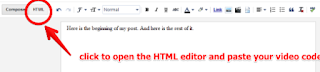
  • Now back to your blog word editor. click on HTML button and paste the code where you want it to appear in the post.
    How to Embed a YouTube Video in a Blogger Blog Post

I hope that helps. If you still have any problem with it, please let me know and I will make a video on how to do it. 
Read More
  • Share This:  
  •  Facebook
  •  Twitter
  •  Google+
  •  Stumble
  •  Digg
loading...

Wednesday, 20 January 2016

Best Way to Claim Blogger Blog in Alexa

 Unknown     10:42     Blogging Tricks     No comments   

Today I'll show you guys “how to submit and verify blogger/blogspot blog in alexa.com”. Alexa is a web information company and they rank every site in the world. The better alexa rank means lower the number of rank. Website value can be determined via alexa rank. So today I’ll show you the best way to claim your blogger blog in alexa.

How claim blogger blog in alexa:

Claiming your site in alexa means you really care about your site and it’s a good sign both to users and web tools. Now follow the steps below to submit and verify your blogger blog in alexa.


Step 1: Go to alexa.com and click on Create an Account from right top corner.


Step 2: A new page will open. You can register in alexa via your facebook account or with a email address.
I’ll suggest you to use email. So put your email address in email box and click on Create button.


Step 3: Login to your email and verify it. Then come back to alexa & do a log-in.


Step 4: Now from alexa menu click on My Dashboard if you don’t redirect automatically. Now click on the Add My Site button.


Step 5: A small popup will open. Enter your site URL in there and click View Plans & Pricing.


Step 6: New page will open and here you will see the plans and price of alexa metrics. But we’ll use the free basic service to claim our blog. So click on claim a site with a free Alexa account option from under the pricing list.


Step 7: You will be landed on alexa claiming page. Enter your site address once again and hit the continue button.


Step 8: In this step you have to verify ownership of your site. You will find three available options here, for blogger blog we will choose 2nd one (Method 2: Add an Alexa verification ID to your homepage). Click on it, a meta tag will be generated & shown to you COPY IT.


Step 9: Now log-in to your blogger blog. Select Template from blogger main menu & click on Edit HTML.

Note: You should always keep a backup of your blogger template.

Search for the <head> tag in HTML editor & after finding the tag immediately paste the copied code (meta tag, what you copied from alexa) just under it (<head>).

Finally hit the Save Template button.


Step 10: Get back to Alexa and hit the Verify my ID button under generated meta tag.
You should see a notification “Your site is successfully claimed”.


Results:

I have made marked screenshot for every step for better understanding. So, if you followed all steps carefully there nothing could be wrong. And if everything gone well, you should see a claimed logo just beside of your site address in Alexa.


Read More
  • Share This:  
  •  Facebook
  •  Twitter
  •  Google+
  •  Stumble
  •  Digg
loading...

Sunday, 10 January 2016

How to Disable Copy Paste In Blogger Blog?

 Unknown     17:11     Blogging Tricks, Special Tricks     No comments   


Just follow the below simple steps to disable copying option on your blogger blog.

  • Go to Blogger Account >>> Blogger Dashboard
  •  
  • After Selecting Layout Tab will Open. Click On"  Add a Gadget ".
  •  
  • Now a again a New Window will Open.Here select " HTML/Java Script

  • Now Copy the Given Below Code and Paste it Here.

<!- START disable copy paste --><script src='demo-to-prevent-copy-paste-on-blogger_files/googleapis.js'></script><script type='text/javascript'> if(typeof document.onselectstart!="undefined" ) {document.onselectstart=new Function ("return false" ); } else{document.onmousedown=new Function ("return false" );document.onmouseup=new Function ("return false"); } </script><!-- End disable copy paste -->


  • Now Save the open window you are almost done!
  •  
Read More
  • Share This:  
  •  Facebook
  •  Twitter
  •  Google+
  •  Stumble
  •  Digg
loading...
Older Posts Home

Popular Posts

  • Airtel New 3G 4G Free Internet Trick With Universal VPN Revision Handler - February 2017
    Airtel New 3G 4G Vpn Trick With Universal Vpn Handler.  I am back here with new airtel free internet vpn trick with universal vpn hand...
  • How To Hack Password Protected .Rar Files
    How To Hack Password Protected .Rar Files   Today we post Method Trick to Unlock or extract password protected .rar or winrar files....
  • Trick To Use Unlimited Data In Tunnel Guru Without Tunnel Guru Premium Account [February 2016]
    Now trending is the Airtel DNS trick. Tunnelguru has the easy interface that provides DNS tunneling . It provides 150mb/ ...
  • Trick To Hack Airtel Digital Tv - Watch Channels For Free
    Steps For Airtel Digital TV Hack Trick to Watch Free Channels :- First of All, Press Menu Button on your Airte...
  • Best Facebook Auto Liker Sites 2017
    Best Facebook Auto Liker Sites List For Get Free Unlimited Facebook Likes. Facebook auto liker tools are used by many facebook users fo...
  • How do I get the owner's details from the vehicle registration number in India (Hindi)
    Ministry of Road Transport and Highways has developed search systems accessible through both SMS and Web for the use of Common Citizen...
  • How to Get Unlimited Friend Request on facebook
    How to Get Unlimited Friend Request on facebook without any blocking issue.This is safe trick to get friend requests Now Facebook...
  • Android Pattern Lock Can Be Cracked In Just 5 Attempt: Here's how
    The popular pattern lock system used to secure millions of Android smartphones can be cracked within just five attempts - and more comp...
  • Uptobox Free Premium Account {Openly Posted} - Valid Till November 2016
    Uptobox.com launch Uptostream.com. You can now stream your files and they are available in HD (360p, 480p, 720p, 1080p) on al...
  • How To Make Unlimited Fake Accounts In Droid VPN For Unlimited Usage Without Premium Account
    Hello Friends, Today Am Sharing This Secret Trick To make Unlimited Droid Vpn Fake Accounts.  Droid Vpn gives only 100mb Bandwidth Limit P...

Categories

  • Android Tricks
  • Blogging Tricks
  • Earn Money Online
  • Facebook Tricks
  • Free
  • Free Internet Data
  • Hacking Tricks
  • How To
  • Information Zone
  • Network Tricks(Airtel)
  • Network Tricks(Other)
  • Online Shopping
  • Opera Tricks
  • Other Tricks
  • PC Tricks
  • Premium Accounts
  • Promo Codes
  • Recharge
  • Reliance Tricks
  • Special Tricks
  • Tech News
  • Tricks in Hindi
  • Troid VPN
  • Tutorials
  • Unlimited
  • Whats App
@PSK4U. Powered by Blogger.

Translate

Protected by Copyscape

Join Us On Facebook

Join Us On Facebook
Like Us On Facebook

Copyright © TECH ADVICE | Powered by Blogger
Design by Pushpendra Singh Koshyari |